Kubernetes 部署 Mysql 8.0.32 MGR 高可用集群
一个用于 MySQL InnoDB Cluster(MGR模式) 在 Kubernetes 环境中自动初始化和维护的集成脚本,使用 Python 编写,包含了集群配置、节点加入、状态监控和恢复机制等完整生命周期的自动化操作。目前已经是一个 “全自动化、容器化适配、具备高可用自愈能力” 的 InnoDB Cluster 管理脚本。它可以在 Kubernetes StatefulSet 中自动判断当前角色、配置管理账号、创建集群或加入集群、并具备自动重试和故障恢复功能,还自带状态监控。
一、自定义镜像制作
1. Dockerfile
给予 mysql/mysql-server:8.0.32 镜像的基础上制作,主要是安装 python3.9 环境
FROM mysql/mysql-server:8.0.32
RUN microdnf install yum dnf jq vim telnet langpacks-en glibc-langpack-en procps net-tools && \
    yum clean all && \
    microdnf clean all

RUN mv /etc/yum.repos.d/oracle-linux-ol8.repo /etc/yum.repos.d/oracle-linux-ol8.repo.backup && \
    mv /etc/yum.repos.d/uek-ol8.repo /etc/yum.repos.d/uek-ol8.repo.backup && \
    mv /etc/yum.repos.d/virt-ol8.repo /etc/yum.repos.d/virt-ol8.repo.backup && \
    curl -o /etc/yum.repos.d/CentOS-Base.repo http://mirrors.aliyun.com/repo/Centos-8.repo && \
    sed -i -e"s|mirrors.cloud.aliyuncs.com|mirrors.aliyun.com|g " /etc/yum.repos.d/CentOS-* && \
    sed -i -e "s|releasever|releasever-stream|g" /etc/yum.repos.d/CentOS-*

RUN dnf makecache && \
    dnf install -y \
    tar \
    bzip2-devel \
    gzip \
    zip \
    unzip \
    openssl \
    openssl-devel \
    ncurses-devel \
    sqlite-devel \
    readline-devel \
    tk-devel \
    libffi-devel \
    zlib-devel \
    xz-devel \
    xz-devel \
    gcc-toolset-9-gcc \
    gcc-toolset-9-gcc-c++ \
    gcc \
    make && \
    dnf clean all && \
    curl -o /usr/local/Python-3.9.0.tgz https://fileserver.tianxiang.love/chfs/shared/zhentianxiang/Linux%E6%96%87%E4%BB%B6/%E4%BA%8C%E8%BF%9B%E5%88%B6%E4%B8%AD%E9%97%B4%E4%BB%B6%E5%92%8C%E5%B7%A5%E5%85%B7/Python-3.9.0.tgz && \
    tar xvf /usr/local/Python-3.9.0.tgz -C /usr/local/ && \
    cd /usr/local/Python-3.9.0 && \
    ./configure --prefix=/usr/local && \
    make -j14 && \
    make install && \
    if [ -L /usr/bin/python3 ]; then rm -rm /usr/bin/python3; fi && \
    ln -s /usr/local/bin/python3.9 /usr/bin/python3 && \
    ln -sf /usr/local/bin/pip3 /usr/bin/pip && \
    sed -i 's|/usr/bin/python|/usr/bin/python2|g' /usr/bin/yum && \
    mkdir -p /root/.pip && \
    echo "[global]" > /root/.pip/pip.conf && \
    echo "index-url = https://mirrors.aliyun.com/pypi/simple/" >> /root/.pip/pip.conf && \
    echo "trusted-host = mirrors.aliyun.com" >> /root/.pip/pip.conf && \
    python3.9 -m pip install --upgrade pip && \
    pip3 install requests

# 拷贝MySQL服务启动脚本和配置集群脚本
COPY setup_mysql_innodb_mgr_cluster.py /etc/mysql-scripts/setup_mysql_innodb_mgr_cluster.py
COPY entrypoint.sh /entrypoint.sh

# 设置环境变量
ENV LC_ALL=en_US.UTF-8
ENV LANG=en_US.UTF-8
ENV LANGUAGE=en_US.UTF-8
2. 创建集群脚本文件
[root@k8s-app-1 build]# cat setup_mysql_innodb_mgr_cluster.py
#!/usr/bin/env python3
# -*- coding: utf-8 -*-
# MySQL InnoDB MGR Cluster 配置脚本
import os
import subprocess
import time
import sys
import json
from typing import Optional, Tuple
sys.stdout.reconfigure(line_buffering=True)

# 环境变量配置(带默认值)
ENV_CONFIG = {
    "MYSQL_ROOT_PASSWORD": os.getenv("MYSQL_ROOT_PASSWORD", "123456"),
    "ADMIN_CONFIG_USER": os.getenv("ADMIN_CONFIG_USER", "configuser"),
    "ADMIN_CONFIG_PASSWORD": os.getenv("ADMIN_CONFIG_PASSWORD", "123456"),
    "ADMIN_CLUSTER_USER": os.getenv("ADMIN_CLUSTER_USER", "adminuser"),
    "ADMIN_CLUSTER_PASSWORD": os.getenv("ADMIN_CLUSTER_PASSWORD", "123456"),
    "CLUSTER_NAME": os.getenv("CLUSTER_NAME", "InnoDB_Cluster8"),
    "MEMBER_WEIGHT_PRIMARY": os.getenv("MEMBER_WEIGHT_PRIMARY", "100"),
    "MEMBER_WEIGHT_SECONDARY": os.getenv("MEMBER_WEIGHT_SECONDARY", "60"),
    "RECOVERY_METHOD": os.getenv("RECOVERY_METHOD", "incremental"),
    "POD_NETWORK": os.getenv("POD_NETWORK", "10.233.0.0/16"),
    "CLUSTER_MODE": os.getenv("CLUSTER_MODE", "false"),  # false = single-primary
    "MY_POD_SVC": os.getenv("MY_POD_SVC", "mysql-svc"),
    "MY_POD_NAMESPACE": os.getenv("MY_POD_NAMESPACE", "default"),
    "HOSTNAME": os.getenv("HOSTNAME", "mysql-0"),
    "MONITOR_INTERVAL": int(os.getenv("MONITOR_INTERVAL", "5")),  # 监控间隔(秒)
    "CMD_RETRIES": int(os.getenv("CMD_RETRIES", "60"))  # 从节点加入集群默认重试次数
}

class MySQLClusterManager:
    def __init__(self):
        self.config = ENV_CONFIG
        self.log_prefix = "[MySQL-Cluster]"
        self.primary_host = None
        self.cluster_initialized = False
        self.last_recovery_attempt = 0
        self.recovery_cooldown = 60  # 恢复尝试冷却时间(秒)

    def log(self, message: str):
        """带时间戳的日志记录"""
        timestamp = time.strftime("%Y-%m-%d %H:%M:%S")
        print(f"{self.log_prefix} [{timestamp}] {message}", flush=True)

    def run_cmd(self, cmd: str, check: bool = True, retries: int = ENV_CONFIG["CMD_RETRIES"], ignore_errors: bool = False) -> Tuple[int, str]:
        """执行 shell 命令并返回状态码和输出"""
        for attempt in range(retries):
            try:
                self.log(f"执行命令(尝试 {attempt+1}/{retries}): {cmd}")
                result = subprocess.run(
                    cmd,
                    shell=True,
                    check=check,
                    stdout=subprocess.PIPE,
                    stderr=subprocess.PIPE,
                    text=True
                )
                return result.returncode, result.stdout
            except subprocess.CalledProcessError as e:
                if ignore_errors:
                    return e.returncode, e.stderr
                if attempt == retries - 1:
                    self.log(f"命令执行失败: {e.stderr}")
                    raise
                time.sleep(2)
        return 1, ""

    def mysql_query(self, query: str, user: str, password: str, host: str = "127.0.0.1") -> Optional[str]:
        """执行 MySQL 查询"""
        cmd = f"mysql -u{user} -p{password} -h{host} -NB -e \"{query}\""
        try:
            output = subprocess.check_output(
                cmd,
                shell=True,
                stderr=subprocess.PIPE,
                text=True
            ).strip()
            return output if output else None
        except subprocess.CalledProcessError:
            return None

    def wait_for_mysql(self, timeout: int = 300):
        """等待 MySQL 服务可用"""
        self.log("等待 MySQL 服务启动...")
        start_time = time.time()
        while time.time() - start_time < timeout:
            if self.mysql_query("SELECT 1", "root", self.config["MYSQL_ROOT_PASSWORD"]) is not None:
                self.log("MySQL 服务已就绪")
                return
            time.sleep(5)
        raise TimeoutError("MySQL 服务启动超时")

    def check_user_exists(self, username: str) -> bool:
        """检查用户是否存在"""
        query = f"SELECT user FROM mysql.user WHERE user='{username}'"
        return self.mysql_query(query, "root", self.config["MYSQL_ROOT_PASSWORD"]) is not None

    def configure_admin_user(self):
        """配置管理用户"""
        if self.check_user_exists(self.config["ADMIN_CONFIG_USER"]):
            self.log(f"管理用户 {self.config['ADMIN_CONFIG_USER']} 已存在")
            return

        self.log(f"创建管理用户 {self.config['ADMIN_CONFIG_USER']}")
        cmd = (
            f"echo 'y' | mysqlsh --uri root:{self.config['MYSQL_ROOT_PASSWORD']}@127.0.0.1 -- "
            f"dba configure-instance --clusterAdmin={self.config['ADMIN_CONFIG_USER']} "
            f"--clusterAdminPassword={self.config['ADMIN_CONFIG_PASSWORD']}"
        )
        self.run_cmd(cmd)
        self.log("管理用户创建成功")

    def is_primary_pod(self) -> bool:
        """判断当前是否为第一个 Pod (Pod-0)"""
        pod_parts = self.config["HOSTNAME"].split("-")
        return len(pod_parts) > 1 and pod_parts[-1] == "0"

    def check_cluster_exists(self) -> bool:
        """检查集群是否已存在"""
        cmd = (
            f"mysqlsh --uri {self.config['ADMIN_CONFIG_USER']}:"
            f"{self.config['ADMIN_CONFIG_PASSWORD']}@127.0.0.1:3306 -- cluster status"
        )
        # 使用 ignore_errors=True 防止命令失败导致脚本退出
        return_code, _ = self.run_cmd(cmd, check=False, ignore_errors=True)
        return return_code == 0

    def check_instance_in_cluster(self) -> bool:
        """检查当前实例是否已在集群中"""
        query = "SELECT MEMBER_STATE FROM performance_schema.replication_group_members WHERE MEMBER_HOST LIKE CONCAT(@@hostname, '%')"
        state = self.mysql_query(query, self.config["ADMIN_CLUSTER_USER"], self.config["ADMIN_CLUSTER_PASSWORD"])
        return state in ('ONLINE', 'RECOVERING')

    def check_gr_status(self) -> str:
        """检查Group Replication状态"""
        query = "SELECT SERVICE_STATE FROM performance_schema.replication_connection_status WHERE CHANNEL_NAME = 'group_replication_applier'"
        return self.mysql_query(query, self.config["ADMIN_CLUSTER_USER"], self.config["ADMIN_CLUSTER_PASSWORD"])

    def check_if_instance_was_primary(self) -> bool:
        """检查当前实例是否曾经是主节点"""
        query = "SELECT MEMBER_ROLE FROM performance_schema.replication_group_members WHERE MEMBER_HOST LIKE CONCAT(@@hostname, '%')"
        role = self.mysql_query(query, self.config["ADMIN_CLUSTER_USER"], self.config["ADMIN_CLUSTER_PASSWORD"])
        return role == 'PRIMARY'

    def recover_instance(self):
        """尝试恢复离线实例"""
        current_time = time.time()
        if current_time - self.last_recovery_attempt < self.recovery_cooldown:
            self.log(f"恢复尝试冷却中,等待 {int(self.recovery_cooldown - (current_time - self.last_recovery_attempt))} 秒")
            return False

        self.last_recovery_attempt = current_time

        try:
            # 1. 检查当前实例是否曾经是主节点
            was_primary = self.check_if_instance_was_primary()

            # 2. 获取当前主节点
            primary_node = self.get_primary_node()
            if not primary_node:
                self.log("无法获取当前主节点信息,恢复失败")
                return False

            self.log(f"尝试恢复实例,当前主节点: {primary_node}")

            # 3. 重新加入集群
            cmd = (
                f"mysqlsh --uri {self.config['ADMIN_CONFIG_USER']}:"
                f"{self.config['ADMIN_CONFIG_PASSWORD']}@{primary_node} -- cluster rejoin-instance "
                f"{self.config['HOSTNAME']}.{self.config['MY_POD_SVC']}.{self.config['MY_POD_NAMESPACE']}:3306"
            )
            return_code, output = self.run_cmd(cmd, ignore_errors=True)

            if return_code == 0:
                self.log("实例恢复成功")
                return True
            else:
                self.log(f"实例恢复失败: {output}")

                # 如果恢复失败且曾经是主节点,尝试重置实例后重新加入
                if was_primary:
                    self.log("尝试重置实例后重新加入集群...")
                    reset_cmd = (
                        f"mysqlsh --uri {self.config['ADMIN_CONFIG_USER']}:"
                        f"{self.config['ADMIN_CONFIG_PASSWORD']}@{primary_node} -- cluster reset-recovery-account "
                        f"{self.config['HOSTNAME']}.{self.config['MY_POD_SVC']}.{self.config['MY_POD_NAMESPACE']}:3306"
                    )
                    self.run_cmd(reset_cmd, ignore_errors=True)

                    # 再次尝试重新加入
                    return_code, output = self.run_cmd(cmd, ignore_errors=True)
                    if return_code == 0:
                        self.log("实例重置并恢复成功")
                        return True
                    else:
                        self.log(f"实例重置后恢复仍然失败: {output}")

                return False

        except Exception as e:
            self.log(f"恢复过程中发生异常: {str(e)}")
            return False

    def get_mysqlsh_version(self) -> Tuple[int, int, int]:
        """获取 MySQL Shell 版本号,返回 (major, minor, patch) 元组"""
        try:
            # 执行 mysqlsh --version 命令获取版本信息
            result = subprocess.run(["mysqlsh", "--version"],
                                  capture_output=True,
                                  text=True,
                                  check=True)

            version_str = result.stdout.strip()
            if not version_str:
                raise RuntimeError("无法获取 MySQL Shell 版本号")

            # 示例输出: "mysqlsh   Ver 8.0.32 for Linux on x86_64 - for MySQL 8.0.32 (MySQL Community Server (GPL))"
            # 我们需要提取第一个出现的版本号(Shell自身的版本)
            import re
            match = re.search(r'Ver (\d+\.\d+\.\d+)', version_str)
            if not match:
                raise RuntimeError("无法从版本字符串中提取版本号")

            version_main = match.group(1)
            version_parts = version_main.split(".")

            # 确保版本号有3个部分,不足的补0
            while len(version_parts) < 3:
                version_parts.append("0")

            major, minor, patch = map(int, version_parts[:3])
            return major, minor, patch
        except Exception as e:
            self.log(f"获取 MySQL Shell 版本失败: {str(e)}")
            raise RuntimeError("无法解析 MySQL Shell 版本号") from e

    def should_use_xcom_protocol(self) -> bool:
        """判断是否使用旧版 XCom 通信协议(MySQL Shell 版本 < 8.0.30)"""
        try:
            version = self.get_mysqlsh_version()
            # 返回 True 如果版本低于 8.0.30
            return version < (8, 0, 30)
        except Exception as e:
            self.log(f"MySQL Shell 版本检测失败,默认使用 XCom 协议: {str(e)}")
            return True  # 失败时保守选择旧协议

    def create_cluster(self):
        """创建新集群并初始化管理员账户"""
        if self.check_cluster_exists():
            self.log("集群已存在,跳过创建")
            return

        self.log("创建新 InnoDB 集群")

        # 构建基础命令
        cmd_parts = [
            f"mysqlsh --uri {self.config['ADMIN_CONFIG_USER']}:{self.config['ADMIN_CONFIG_PASSWORD']}@127.0.0.1:3306 --",
            f"dba create-cluster {self.config['CLUSTER_NAME']}",
            f"--multiPrimary={self.config['CLUSTER_MODE']}",
            f"--memberWeight={self.config['MEMBER_WEIGHT_PRIMARY']}"
        ]

        # 根据版本决定通信协议和参数
        if self.should_use_xcom_protocol():
            self.log("使用 XCom 通信协议 (MySQLSH < 8.0.30)")
            cmd_parts.append(f"--ipAllowlist=\"{self.config['POD_NETWORK']}\"")
        else:
            self.log("使用 MySQL 通信协议 (MySQLSH ≥ 8.0.30)")
            cmd_parts.append("--communicationStack=MYSQL")

        cmd = " ".join(cmd_parts)
        self.run_cmd(cmd)

        # 创建集群管理员账户
        self.log(f"创建集群管理员账户 {self.config['ADMIN_CLUSTER_USER']}")
        admin_cmd = (
            f"echo 'y' | mysqlsh --uri {self.config['ADMIN_CONFIG_USER']}:"
            f"{self.config['ADMIN_CONFIG_PASSWORD']}@127.0.0.1:3306 -- "
            f"cluster setup-admin-account {self.config['ADMIN_CLUSTER_USER']}@% "
            f"--password='{self.config['ADMIN_CLUSTER_PASSWORD']}'"
        )
        self.run_cmd(admin_cmd)
        self.log("集群创建和管理员账户设置完成")

    def find_available_node(self) -> str:
        """查找集群中可用的节点"""
        pod_base = "-".join(self.config["HOSTNAME"].split("-")[:-1])
        pod_num = int(self.config["HOSTNAME"].split("-")[-1])

        for i in range(pod_num - 1, -1, -1):
            target_pod = f"{pod_base}-{i}.{self.config['MY_POD_SVC']}"
            if self.mysql_query("SELECT 1",
                               self.config["ADMIN_CONFIG_USER"],
                               self.config["ADMIN_CONFIG_PASSWORD"],
                               target_pod) is not None:
                self.log(f"找到可用节点: {target_pod}")
                return target_pod
        raise RuntimeError("未找到可用集群节点")

    def get_primary_node(self, contact_node: str = None) -> str:
        """获取当前主节点"""
        if not contact_node:
            query = (
                "SELECT MEMBER_HOST FROM performance_schema.replication_group_members "
                "WHERE MEMBER_ROLE='PRIMARY' LIMIT 1"
            )
            primary = self.mysql_query(query, self.config["ADMIN_CLUSTER_USER"],
                                       self.config["ADMIN_CLUSTER_PASSWORD"])
            if primary:
                return primary
            contact_node = "127.0.0.1"

        self.log(f"从 {contact_node} 获取主节点信息...")
        cmd = (
            f"mysqlsh --uri {self.config['ADMIN_CLUSTER_USER']}:"
            f"{self.config['ADMIN_CLUSTER_PASSWORD']}@{contact_node}:3306 -- cluster status"
        )
        return_code, output = self.run_cmd(cmd, ignore_errors=True)

        if return_code != 0:
            self.log("获取集群状态失败")
            return None

        try:
            # 过滤掉非 JSON 行(如 WARNING)
            json_start = output.find("{")
            if json_start == -1:
                self.log("未找到有效的 JSON 输出")
                return None
            json_text = output[json_start:]
            data = json.loads(json_text)
            primary = data.get("defaultReplicaSet", {}).get("primary")
            if primary:
                return primary.split(":")[0]
            return None
        except json.JSONDecodeError:
            self.log("解析集群状态失败")
            return None

    def join_cluster(self):
        """将当前节点加入集群"""
        if self.is_primary_pod():
            self.log("当前为 Pod-0,跳过加入流程,已在 create_cluster 中处理")
            return

        try:
            contact_node = self.find_available_node()
            primary_node = self.get_primary_node(contact_node)
            if not primary_node:
                raise RuntimeError("未能获取主节点信息,无法加入集群")

            # 检查当前实例是否已在集群中
            if self.check_instance_in_cluster():
                self.log("当前实例已在集群中,跳过加入流程")
                return

            self.log(f"将 {self.config['HOSTNAME']} 加入集群,主节点: {primary_node}")

            # 构建基础命令
            cmd_parts = [
                f"mysqlsh --uri {self.config['ADMIN_CONFIG_USER']}:{self.config['ADMIN_CONFIG_PASSWORD']}@{primary_node} --",
                f"cluster add-instance {self.config['HOSTNAME']}.{self.config['MY_POD_SVC']}.{self.config['MY_POD_NAMESPACE']}:3306",
                f"--memberWeight={self.config['MEMBER_WEIGHT_SECONDARY']}",
                f"--recoveryMethod={self.config['RECOVERY_METHOD']}"
            ]

            # 只有旧版本需要 ipAllowlist 参数
            if self.should_use_xcom_protocol():
                self.log("使用 XCom 协议加入集群,添加 ipAllowlist 参数")
                cmd_parts.append(f"--ipAllowlist={self.config['POD_NETWORK']}")
            else:
                self.log("使用 MySQL 通信协议加入集群")

            cmd = " ".join(cmd_parts)
            self.run_cmd(cmd)

            # 检查并创建集群管理员账户(若需要)
            if not self.check_user_exists(self.config["ADMIN_CLUSTER_USER"]):
                self.log(f"创建集群管理员账户 {self.config['ADMIN_CLUSTER_USER']}")
                cmd = (
                    f"echo 'y' | mysqlsh --uri {self.config['ADMIN_CONFIG_USER']}:"
                    f"{self.config['ADMIN_CONFIG_PASSWORD']}@{primary_node} -- "
                    f"cluster setup-admin-account {self.config['ADMIN_CLUSTER_USER']}@% "
                    f"--password='{self.config['ADMIN_CLUSTER_PASSWORD']}'"
                )
                self.run_cmd(cmd)

        except Exception as e:
            self.log(f"加入集群失败: {str(e)}")
            raise

    def monitor_cluster(self):
        """持续监控集群状态"""
        self.log("启动集群监控服务")
        while True:
            try:
                # 获取当前主节点
                current_primary = self.get_primary_node()
                if current_primary and current_primary != self.primary_host:
                    self.primary_host = current_primary
                    self.log(f"主节点切换: {self.primary_host}")

                # 检查当前实例的Group Replication状态
                gr_status = self.check_gr_status()
                if gr_status != 'ON':
                    self.log(f"Group Replication状态异常: {gr_status or 'UNKNOWN'}")
                    if not self.recover_instance():
                        self.log("恢复实例失败,将在下次监控周期重试")

                # 检查集群状态
                status_cmd = (
                    f"mysqlsh --uri {self.config['ADMIN_CLUSTER_USER']}:"
                    f"{self.config['ADMIN_CLUSTER_PASSWORD']}@{self.primary_host or '127.0.0.1'}:3306 "
                    f"-- cluster status"
                )
                return_code, output = self.run_cmd(status_cmd, ignore_errors=True)
                if return_code == 0:
                    self.log(f"集群状态:\n{output}")
                else:
                    self.log("获取集群状态失败")

            except Exception as e:
                self.log(f"监控异常: {str(e)}")

            time.sleep(self.config["MONITOR_INTERVAL"])

    def run(self):
        """主执行流程"""
        try:
            # 1. 等待 MySQL 服务就绪
            self.wait_for_mysql()

            # 2. 检查是否已经初始化过
            if self.check_user_exists(self.config["ADMIN_CONFIG_USER"]):
                self.log("检测到管理用户已存在,跳过初始化步骤")
                self.cluster_initialized = True

            # 3. 配置管理用户(如果尚未初始化)
            if not self.cluster_initialized:
                self.configure_admin_user()

            # 4. 检查集群状态
            if self.check_cluster_exists() or self.check_instance_in_cluster():
                self.log("检测到集群已存在或当前实例已在集群中,跳过集群创建/加入步骤")
                self.cluster_initialized = True

            # 5. 主节点创建集群或从节点加入集群(如果尚未初始化)
            if not self.cluster_initialized:
                if self.is_primary_pod():
                    self.create_cluster()
                else:
                    self.join_cluster()

            # 6. 启动监控服务
            self.monitor_cluster()

        except Exception as e:
            self.log(f"初始化失败: {str(e)}")
            exit(1)

if __name__ == "__main__":
    manager = MySQLClusterManager()
    manager.run()
3. MySQL 容器启动脚本文件
[root@k8s-master1 build]# cat entrypoint.sh
#!/bin/bash
# 版权所有 (c) 2017, 2023, Oracle 公司及其附属机构。
#
# 本程序为自由软件;您可以根据自由软件基金会发布的 GNU 通用公共许可证第 2 版重新发布和/或修改。
#
# 本程序以希望能对您有所帮助的方式发布,但不提供任何担保。
# 详情请参阅 GNU 通用公共许可证。
set -e

# 日志函数
log() {
    local level="$1"
    local message="$2"
    local timestamp=$(date +"%Y-%m-%d %H:%M:%S")
    echo "[${timestamp}] [启动脚本] [${level}] ${message}"
}

log "INFO" "MySQL Docker 镜像 8.0.32-1.2.11-server 启动中..."

# 从配置中获取参数值
_get_config() {
    local conf="$1"; shift
    "$@" --verbose --help 2>/dev/null | grep "^$conf" | awk '$1 == "'"$conf"'" { print $2; exit }'
}

# 生成随机密码
_mkpw() {
    letter=$(cat /dev/urandom | tr -dc a-zA-Z | dd bs=1 count=16 2>/dev/null )
    number=$(cat /dev/urandom | tr -dc 0-9 | dd bs=1 count=8 2>/dev/null)
    special=$(cat /dev/urandom | tr -dc '=+@#%^&*_.,;:?/' | dd bs=1 count=8 2>/dev/null)
    echo $letter$number$special | fold -w 1 | shuf | tr -d '\n'
}

# 如果命令以 - 开头,则补全为 mysqld 命令
if [ "${1:0:1}" = '-' ]; then
    set -- mysqld "$@"
    log "DEBUG" "检测到以 '-' 开头的参数,补全为 mysqld 命令: mysqld $@"
fi

# 判断是否以 root 用户运行
if [ "$(id -u)" = "0" ]; then
    is_root=1
    install_devnull="install /dev/null -m0600 -omysql -gmysql"
    MYSQLD_USER=mysql
    log "DEBUG" "以 root 用户运行,设置 mysql 用户权限"
else
    install_devnull="install /dev/null -m0600"
    MYSQLD_USER=$(id -u)
    log "DEBUG" "以非 root 用户 (UID: $MYSQLD_USER) 运行"
fi

if [ "$1" = 'mysqld' ]; then
    log "INFO" "检测到 mysqld 命令,开始处理..."

    result=0
    output=$("$@" --validate-config) || result=$?
    if [ "$result" != "0" ]; then
        log "ERROR" "无法启动 MySQL,请检查配置。错误输出: $output"
        exit 1
    else
        log "DEBUG" "MySQL 配置验证通过"
    fi

    DATADIR="$(_get_config 'datadir' "$@")"
    SOCKET="$(_get_config 'socket' "$@")"
    log "DEBUG" "获取到配置 - 数据目录: $DATADIR, 套接字: $SOCKET"

    if [ ! -d "$DATADIR/mysql" ]; then
        log "INFO" "检测到新数据库安装,开始初始化..."

        if [ -f "$MYSQL_ROOT_PASSWORD" ]; then
            MYSQL_ROOT_PASSWORD="$(cat $MYSQL_ROOT_PASSWORD)"
            if [ -z "$MYSQL_ROOT_PASSWORD" ]; then
                log "ERROR" "提供的 root 密码文件为空。"
                exit 1
            fi
            log "DEBUG" "从文件加载了 root 密码"
        fi

        if [ -z "$MYSQL_ROOT_PASSWORD" ] && [ -z "$MYSQL_ALLOW_EMPTY_PASSWORD" ] && [ -z "$MYSQL_RANDOM_ROOT_PASSWORD" ]; then
            log "INFO" "未指定 root 密码选项,将自动生成一次性随机密码。"
            MYSQL_RANDOM_ROOT_PASSWORD=true
            MYSQL_ONETIME_PASSWORD=true
        fi

        if [ ! -d "$DATADIR" ]; then
            mkdir -p "$DATADIR"
            chown mysql:mysql "$DATADIR"
            log "DEBUG" "创建并设置了数据目录权限: $DATADIR"
        fi

        log "INFO" "正在初始化数据库..."
        "$@" --user=$MYSQLD_USER --initialize-insecure --default-time-zone=+00:00
        log "INFO" "数据库初始化完成。"

        log "INFO" "启动临时 MySQL 实例进行初始配置..."
        "$@" --user=$MYSQLD_USER --daemonize --skip-networking --socket="$SOCKET" --default-time-zone=+00:00

        PASSFILE=$(mktemp -u /var/lib/mysql-files/XXXXXXXXXX)
        $install_devnull "$PASSFILE"
        log "DEBUG" "创建临时密码文件: $PASSFILE"

        mysql=( mysql --defaults-extra-file="$PASSFILE" --protocol=socket -uroot -hlocalhost --socket="$SOCKET" --init-command="SET @@SESSION.SQL_LOG_BIN=0;")

        log "INFO" "等待 MySQL 启动..."
        for i in {30..0}; do
            if mysqladmin --socket="$SOCKET" ping &>/dev/null; then
                log "INFO" "MySQL 启动成功"
                break
            fi
            log "DEBUG" "等待 MySQL 启动...剩余尝试次数: $i"
            sleep 1
        done

        if [ "$i" = 0 ]; then
            log "ERROR" "MySQL 初始化超时。"
            exit 1
        fi

        log "INFO" "导入时区信息..."
        mysql_tzinfo_to_sql /usr/share/zoneinfo | "${mysql[@]}" mysql 2>&1 | while read line; do
            log "DEBUG" "时区导入: $line"
        done

        if [ -n "$MYSQL_RANDOM_ROOT_PASSWORD" ]; then
            MYSQL_ROOT_PASSWORD="$(_mkpw)"
            log "INFO" "随机生成的 root 密码: $MYSQL_ROOT_PASSWORD"
        fi

        if [ -z "$MYSQL_ROOT_HOST" ]; then
            ROOTCREATE="ALTER USER 'root'@'localhost' IDENTIFIED BY '${MYSQL_ROOT_PASSWORD}'; \
            DELETE FROM mysql.user WHERE User=''; \
            DROP DATABASE IF EXISTS test; \
            FLUSH PRIVILEGES;"
            log "DEBUG" "配置本地 root 用户"
        else
            ROOTCREATE="ALTER USER 'root'@'localhost' IDENTIFIED BY '${MYSQL_ROOT_PASSWORD}'; \
            DROP USER IF EXISTS 'root'@'${MYSQL_ROOT_HOST}'; \
            CREATE USER 'root'@'${MYSQL_ROOT_HOST}' IDENTIFIED BY '${MYSQL_ROOT_PASSWORD}'; \
            GRANT ALL ON *.* TO 'root'@'${MYSQL_ROOT_HOST}' WITH GRANT OPTION; \
            GRANT PROXY ON ''@'' TO 'root'@'${MYSQL_ROOT_HOST}' WITH GRANT OPTION; \
            DELETE FROM mysql.user WHERE User=''; \
            DROP DATABASE IF EXISTS test; \
            FLUSH PRIVILEGES;"
            log "DEBUG" "配置本地和远程 (${MYSQL_ROOT_HOST}) root 用户"
        fi

        log "INFO" "执行初始 SQL 命令..."
        "${mysql[@]}" <<-EOSQL
            DELETE FROM mysql.user WHERE user NOT IN ('mysql.infoschema', 'mysql.session', 'mysql.sys', 'root') OR host NOT IN ('localhost');
            CREATE USER 'healthchecker'@'localhost' IDENTIFIED BY 'healthcheckpass';
            ${ROOTCREATE}
            FLUSH PRIVILEGES ;
EOSQL

        if [ -n "$MYSQL_ROOT_PASSWORD" ]; then
            cat >"$PASSFILE" <<EOF
[client]
password="${MYSQL_ROOT_PASSWORD}"
EOF
            log "DEBUG" "更新密码文件"
        fi

        if [ "$MYSQL_DATABASE" ]; then
            log "INFO" "创建数据库: $MYSQL_DATABASE"
            echo "CREATE DATABASE IF NOT EXISTS \`$MYSQL_DATABASE\` ;" | "${mysql[@]}"
            mysql+=( "$MYSQL_DATABASE" )
        fi

        if [ "$MYSQL_USER" ] && [ "$MYSQL_PASSWORD" ]; then
            log "INFO" "创建用户: $MYSQL_USER"
            echo "CREATE USER '${MYSQL_USER}'@'%' IDENTIFIED BY '${MYSQL_PASSWORD}' ;" | "${mysql[@]}"
            if [ "$MYSQL_DATABASE" ]; then
                log "INFO" "授予用户 $MYSQL_USER 对数据库 $MYSQL_DATABASE 的权限"
                echo "GRANT ALL ON \`${MYSQL_DATABASE}\`.* TO '${MYSQL_USER}'@'%' ;" | "${mysql[@]}"
            fi
        elif [ "$MYSQL_USER" ] || [ "$MYSQL_PASSWORD" ]; then
            log "WARNING" "未创建用户,MYSQL_USER 与 MYSQL_PASSWORD 必须同时设置才会创建。"
        fi

        log "INFO" "处理初始化脚本..."
        for f in /docker-entrypoint-initdb.d/*; do
            case "$f" in
                *.sh)
                    log "INFO" "执行脚本 $f"
                    . "$f"
                    ;;
                *.sql)
                    log "INFO" "执行 SQL 文件 $f"
                    "${mysql[@]}" < "$f" && echo
                    ;;
                *)
                    log "INFO" "忽略文件 $f"
                    ;;
            esac
        done

        log "INFO" "关闭临时 MySQL 实例..."
        mysqladmin --defaults-extra-file="$PASSFILE" shutdown -uroot --socket="$SOCKET"
        rm -f "$PASSFILE"
        unset PASSFILE
        log "INFO" "MySQL 已关闭。"

        if [ -n "$MYSQL_ONETIME_PASSWORD" ]; then
            log "INFO" "设置 root 用户密码过期,首次登录后需要修改密码。"
            SQL=$(mktemp -u /var/lib/mysql-files/XXXXXXXXXX)
            $install_devnull "$SQL"
            if [ -n "$MYSQL_ROOT_HOST" ]; then
                cat << EOF > "$SQL"
ALTER USER 'root'@'${MYSQL_ROOT_HOST}' PASSWORD EXPIRE;
ALTER USER 'root'@'localhost' PASSWORD EXPIRE;
EOF
            else
                cat << EOF > "$SQL"
ALTER USER 'root'@'localhost' PASSWORD EXPIRE;
EOF
            fi
            set -- "$@" --init-file="$SQL"
            unset SQL
        fi

        log "INFO" "MySQL 初始化流程完成,准备正式启动。"
    fi

    cat > /var/lib/mysql-files/healthcheck.cnf <<EOF
[client]
user=healthchecker
socket=${SOCKET}
password=healthcheckpass
EOF
    touch /var/lib/mysql-files/mysql-init-complete
    log "DEBUG" "创建健康检查配置和初始化完成标志"

    if [ -n "$MYSQL_INITIALIZE_ONLY" ]; then
        log "INFO" "MYSQL_INITIALIZE_ONLY 设置为 true,仅初始化,不启动 MySQL。"
        exit 0
    else
        log "INFO" "正在启动 MySQL 8.0.32-1.2.11-server"
    fi

    export MYSQLD_PARENT_PID=$(cat /proc/$$/stat | cut -d\  -f4)
    log "DEBUG" "设置 MySQL 父进程 ID: $MYSQLD_PARENT_PID"

    log "INFO" "启动 MySQL 服务..."
    "$@" --user=$MYSQLD_USER &

    log "INFO" "开始实时输出 MySQL 日志: /var/lib/mysql/mysqld.log"
    tail -F /var/lib/mysql/mysqld.log | while read line; do
        log "MYSQL" "$line"
    done
else
    log "INFO" "执行命令: $@"
    exec "$@"
fi
4. build 制作镜像
[root@k8s-master1 build]# ls
Dockerfile  entrypoint.sh  setup_mysql_innodb_mgr_cluster.py
[root@k8s-master1 build]# chmod +x entrypoint.sh
[root@k8s-master1 build]# docker build --add-host fileserver.tianxiang.love:192.168.233.246 . -t  registry.cn-hangzhou.aliyuncs.com/tianxiang_app/mysql-mgr-innodb-cluster:8.0.32
二、脚本介绍
✅ 1. 环境配置与参数初始化
支持通过环境变量传入配置,包括:
数据库 root 密码、管理用户信息、集群名称、主从节点权重
网络配置(如允许的 IP 范围)、Pod 名字、Namespace 等
运行模式(single-primary / multi-primary)、恢复策略等
✅ 2. MySQL 节点初始化与配置
等待 MySQL 服务可连接 (wait_for_mysql)
创建或跳过集群管理用户 (configure_admin_user)
判断当前节点是否为 Pod-0(主节点) (is_primary_pod)
✅ 3. 集群状态判断与初始化
判断集群是否存在 (check_cluster_exists)
判断当前节点是否已经加入集群 (check_instance_in_cluster)
Pod-0 负责创建新集群并设置集群管理员账户 (create_cluster)
非 Pod-0 的节点通过已有节点加入集群 (join_cluster)
自动为新节点配置集群管理员账户(如果缺失)
✅ 4. 节点恢复与故障自愈
检查 Group Replication 状态 (check_gr_status)
自动恢复失联实例或曾是主节点的实例 (recover_instance)
使用 cluster rejoin-instance 尝试恢复
如果失败并且节点曾是主节点,会调用 reset-recovery-account 再尝试恢复
✅ 5. 自动发现与通信辅助功能
动态发现已启动的兄弟节点 (find_available_node)
获取当前集群主节点地址 (get_primary_node)
判断节点曾经是否是 PRIMARY (check_if_instance_was_primary)
✅ 6. 集群状态实时监控
通过 monitor_cluster 循环:
检查主节点是否变化
检查本节点 GR 状态异常时自动调用恢复
每个周期输出 cluster status 状态信息
支持冷却时间限制,避免频繁恢复
✅ 7. 结构设计与容器适配
以类 MySQLClusterManager 封装所有逻辑
主执行函数 run() 会执行整个流程:初始化 -> 加入集群 -> 启动监控
main 中实例化并运行,适合容器中以主进程运行
三、服务部署
1. MysSQL INNODB 配置文件
[root@k8s-master1 mysql-innodb-cluster]# cat configmap.yaml
apiVersion: v1
kind: ConfigMap
metadata:
  name: mysql-innodb-cluster-config
  namespace: mysql-cluster
data:
  my.cnf: |
    [client]
    default-character-set=utf8mb4

    [mysql]
    default-character-set=utf8mb4

    [mysqld]
    # 服务基本配置
    user = mysql
    bind-address = 0.0.0.0
    character_set_server = utf8mb4
    collation-server = utf8mb4_unicode_ci
    default-time_zone = '+8:00'
    lower_case_table_names = 1

    # interactive_timeout 针对交互式客户端(如命令行)
    interactive_timeout = 7200
    # wait_timeout 针对非交互式客户端(如应用程序连接)
    wait_timeout = 1800

    # 事件调度器
    event_scheduler = ON

    # 连接与数据包大小
    max_connections = 2000
    max_allowed_packet = 500M

    # 禁用不常用引擎
    disabled_storage_engines = "MyISAM,BLACKHOLE,FEDERATED,ARCHIVE,MEMORY"

    # 日志相关设置
    log_error = /var/lib/mysql/mysqld.log
    pid_file = /var/run/mysqld/mysqld.pid
    log_bin = /var/lib/mysql/bin-log
    relay_log = mysql-relay-bin
    relay_log_index = mysql-relay-bin.index
    relay_log_recovery = ON
    log_bin_trust_function_creators = 1
    log_slave_updates = ON

    # 二进制日志
    binlog_format = ROW
    binlog_expire_logs_seconds = 2592000
    binlog_checksum = NONE

    # MGR复制优化
    replica_parallel_type = LOGICAL_CLOCK
    replica_parallel_workers = 4
    replica_preserve_commit_order = ON
    replica_net_timeout = 60

    # 事务和InnoDB参数
    transaction_isolation = REPEATABLE-READ
    innodb_flush_log_at_trx_commit = 1
    innodb_file_per_table = 1
    innodb_flush_method = O_DIRECT
    innodb_flush_neighbors = 2

    # 缓存与日志大小
    innodb_buffer_pool_size = 8G
    innodb_buffer_pool_instances = 8
    innodb_log_file_size = 1G
    innodb_log_files_in_group = 3
    innodb_log_buffer_size = 32M
    max_binlog_cache_size = 1024M

    # IO与并发
    innodb_io_capacity = 800
    innodb_io_capacity_max = 1600
    innodb_write_io_threads = 4
    innodb_read_io_threads = 4
    innodb_purge_threads = 2
    innodb_adaptive_flushing = ON

    # LRU策略
    innodb_lru_scan_depth = 1000
    innodb_old_blocks_pct = 35
    innodb_change_buffer_max_size = 50

    # 锁与回滚
    innodb_lock_wait_timeout = 35
    innodb_rollback_on_timeout = ON

    # 启动关闭
    innodb_fast_shutdown = 0
    innodb_force_recovery = 0
    innodb_buffer_pool_dump_at_shutdown = 1
    innodb_buffer_pool_load_at_startup = 1

    # 并发线程
    thread_cache_size = 500
    innodb_thread_concurrency = 0
    innodb_spin_wait_delay = 30
    innodb_sync_spin_loops = 100

    # 内存缓冲
    read_buffer_size = 8M
    read_rnd_buffer_size = 8M
    bulk_insert_buffer_size = 128M

    # 优化器设置
    optimizer_switch = "index_condition_pushdown=on,mrr=on,mrr_cost_based=on,batched_key_access=off,block_nested_loop=on"

    # 拼接长度
    group_concat_max_len = 102400

    # 表缓存
    table_open_cache = 2048

    # GTID支持
    enforce_gtid_consistency = ON
    gtid_mode = ON

    # 自增主键偏移
    auto_increment_increment = 1
    auto_increment_offset = 2

    # 安全配置
    allow-suspicious-udfs = OFF
    local_infile = OFF
    skip-grant-tables = OFF
    safe-user-create

    # 文件路径
    datadir = /var/lib/mysql
    socket = /var/lib/mysql/mysql.sock

    # SQL模式
    sql_mode = 'STRICT_TRANS_TABLES,NO_ZERO_IN_DATE,NO_ZERO_DATE,ERROR_FOR_DIVISION_BY_ZERO,NO_ENGINE_SUBSTITUTION'

    # 慢查询日志(可选)
    # slow_query_log = 1
    # slow_query_log_file = /var/lib/mysql/slow_query.log
    # log_queries_not_using_indexes = ON

    # 密码策略(可选)
    # plugin_load_add = 'validate_password.so'
    # validate_password_policy = MEDIUM
    # validate_password_length = 14

    # SSL加密(可选)
    # ssl_ca = "/etc/cert/ca.pem"
    # ssl_cert = "/etc/cert/server.crt"
    # ssl_key = "/etc/cert/server.key"
    # require_secure_transport = ON
    # tls_version = TLSv1.2
2. statefulset 启动文件
[root@k8s-master1 mysql]# cat statefuleset.yaml
kind: StatefulSet
apiVersion: apps/v1
metadata:
  name: mysql-innodb-cluster
  namespace: mysql-cluster
  labels:
    app: mysql-innodb-cluster
spec:
  serviceName: mysql-innodb-cluster
  replicas: 3
  selector:
    matchLabels:
      app: mysql-innodb-cluster
  template:
    metadata:
      labels:
        app: mysql-innodb-cluster
    spec:
      affinity:
        nodeAffinity:
          preferredDuringSchedulingIgnoredDuringExecution:
            - weight: 100
              preference:
                matchExpressions:
                  - key: middleware
                    operator: In
                    values:
                      - "true"
        podAntiAffinity:
          preferredDuringSchedulingIgnoredDuringExecution:
            - weight: 100
              podAffinityTerm:
                labelSelector:
                  matchLabels:
                    app: mysql-innodb-cluster
                topologyKey: kubernetes.io/hostname
      tolerations:
        - key: middleware
          operator: Equal
          value: "true"
          effect: NoSchedule
      initContainers:
        - name: init-config
          image: 'busybox:1.35'
          imagePullPolicy: Always
          command:
            - sh
          args:
            - '-c'
            - >-
              cp /config-map/my.cnf /mnt/my.cnf;

              ordinal=$(echo $HOSTNAME |grep  '[0-9]' -o)

              echo -e "\nserver-id=$((100 + $ordinal))" >> /mnt/my.cnf

              echo -e
              "\nreport_host=${HOSTNAME}.${MY_POD_SVC}.${MY_POD_NAMESPACE}.svc.cluster.local" >>
              /mnt/my.cnf

              cat /mnt/my.cnf
          env:
            - name: MY_POD_NAMESPACE
              valueFrom:
                fieldRef:
                  apiVersion: v1
                  fieldPath: metadata.namespace
            - name: MY_POD_SVC
              value: mysql-innodb-cluster
          resources: {}
          volumeMounts:
            - name: mysql-innodb-cluster-config
              readOnly: true
              mountPath: /config-map
            - name: mysqlconf
              mountPath: /mnt
      containers:
        - name: set-cluster
          image: registry.cn-hangzhou.aliyuncs.com/tianxiang_app/mysql-mgr-innodb-cluster:8.0.32
          imagePullPolicy: Always
          command: ["/usr/bin/python3", "/etc/mysql-scripts/setup_mysql_innodb_mgr_cluster.py"]
          env:
            - name: POD_NETWORK
              value: "192.18.0.0/16"
            - name: MY_POD_SVC
              value: mysql-innodb-cluster
            - name: MYSQL_ROOT_PASSWORD
              valueFrom:
                secretKeyRef:
                  name: mysql-innodb-cluster-secrets
                  key: root_password
            - name: ADMIN_CONFIG_PASSWORD
              valueFrom:
                secretKeyRef:
                  name: mysql-innodb-cluster-secrets
                  key: admin_config_password
            - name: ADMIN_CLUSTER_PASSWORD
              valueFrom:
                secretKeyRef:
                  name: mysql-innodb-cluster-secrets
                  key: admin_cluster_password
            - name: MY_POD_NAMESPACE
              valueFrom:
                fieldRef:
                  apiVersion: v1
                  fieldPath: metadata.namespace
          resources:
            limits:
              cpu: '1'
              memory: 1Gi
            requests:
              cpu: '0.5'
              memory: 500Mi
          volumeMounts:
            - name: host-time
              mountPath: /etc/localtime
        - name: mysql
          image: registry.cn-hangzhou.aliyuncs.com/tianxiang_app/mysql-mgr-innodb-cluster:8.0.32
          imagePullPolicy: Always
          ports:
            - name: tcp-3306
              containerPort: 3306
              protocol: TCP
            - name: tcp-33060
              containerPort: 33060
              protocol: TCP
            - name: tcp-33061
              containerPort: 33061
              protocol: TCP
          env:
            - name: POD_NETWORK
              value: "192.18.0.0/16"
            - name: MY_POD_SVC
              value: mysql-innodb-cluster
            - name: MYSQL_ROOT_PASSWORD
              valueFrom:
                secretKeyRef:
                  name: mysql-innodb-cluster-secrets
                  key: root_password
            - name: ADMIN_CONFIG_PASSWORD
              valueFrom:
                secretKeyRef:
                  name: mysql-innodb-cluster-secrets
                  key: admin_config_password
            - name: ADMIN_CLUSTER_PASSWORD
              valueFrom:
                secretKeyRef:
                  name: mysql-innodb-cluster-secrets
                  key: admin_cluster_password
            - name: MYSQL_ROOT_HOST
              value: "%"
            - name: MY_POD_NAMESPACE
              valueFrom:
                fieldRef:
                  apiVersion: v1
                  fieldPath: metadata.namespace
            - name: MY_POD_REPLICAS
              value: "3"
          resources:
            limits:
              cpu: '4'
              memory: 8Gi
            requests:
              cpu: '4'
              memory: 8Gi
          volumeMounts:
            - name: host-time
              mountPath: /etc/localtime
            - name: data
              mountPath: /var/lib/mysql
            - name: mysqlconf
              readOnly: true
              mountPath: /etc/my.cnf
              subPath: my.cnf
      volumes:
        - name: host-time
          hostPath:
            path: /etc/localtime
            type: ''
        - name: mysql-innodb-cluster-config
          configMap:
            name: mysql-innodb-cluster-config
            defaultMode: 420
        - name: mysqlconf
          emptyDir: {}
      restartPolicy: Always
  volumeClaimTemplates:
    - kind: PersistentVolumeClaim
      apiVersion: v1
      metadata:
        name: data
        namespace: mysql-cluster
      spec:
        accessModes:
          - ReadWriteOnce
        resources:
          requests:
            storage: 500Gi
        storageClassName: openebs-hostpath
        volumeMode: Filesystem
---
kind: Service
apiVersion: v1
metadata:
  name: mysql-innodb-cluster
  namespace: mysql-cluster
  labels:
    app: mysql-innodb-cluster
spec:
  ports:
    - name: tcp-3306
      protocol: TCP
      port: 3306
      targetPort: 3306
    - name: tcp-33060
      protocol: TCP
      port: 33060
      targetPort: 33060
    - name: tcp-33061
      protocol: TCP
      port: 33061
      targetPort: 33061
  selector:
    app: mysql-innodb-cluster
  clusterIP: None
3. secret 密码文件
[root@k8s-master1 mysql-mgr-cluster]# cat secrets.yaml
apiVersion: v1
kind: Secret
metadata:
  name: mysql-innodb-cluster-secrets
  namespace: mysql-cluster
type: Opaque
data:
  # echo -n '123456' | base64    不加 -n 会有换符
  root_password: MTIzNDU2
  admin_config_password: MTIzNDU2
  admin_cluster_password: MTIzNDU2
4. MySQL Router 服务
[root@k8s-master1 mysql]# cat deployment.yaml
kind: Deployment
apiVersion: apps/v1
metadata:
  name: mysql-innodb-cluster-router
  namespace: mysql-cluster
  labels:
    app: mysql-innodb-cluster-router
spec:
  replicas: 3
  selector:
    matchLabels:
      app: mysql-innodb-cluster-router
  template:
    metadata:
      labels:
        app: mysql-innodb-cluster-router
    spec:
      affinity:
        nodeAffinity:
          preferredDuringSchedulingIgnoredDuringExecution:
            - weight: 100
              preference:
                matchExpressions:
                  - key: middleware
                    operator: In
                    values:
                      - "true"
        podAntiAffinity:
          preferredDuringSchedulingIgnoredDuringExecution:
            - weight: 100
              podAffinityTerm:
                labelSelector:
                  matchLabels:
                    app: mysql-innodb-cluster-router
                topologyKey: kubernetes.io/hostname
      tolerations:
        - key: instance
          operator: Equal
          value: mysql-cluster
          effect: NoSchedule
      # 添加初始化容器
      initContainers:
        - name: wait-for-mysql
          image: registry.cn-hangzhou.aliyuncs.com/tianxiang_app/mysql-mgr-innodb-cluster:8.0.32
          command:
            - sh
            - -c
            - |
              echo "等待 MySQL 集群状态满足条件..."

              while true; do
                output=$(mysql -u${MYSQL_USER} -p${ADMIN_CLUSTER_PASSWORD} -h${MYSQL_HOST} -e "SELECT MEMBER_ID, MEMBER_ROLE, MEMBER_STATE FROM performance_schema.replication_group_members\G" 2>/dev/null)

                if [ $? -ne 0 ]; then
                  echo "MySQL 登录失败,等待 2 秒后重试..."
                  sleep 2
                  continue
                fi

                count=$(echo "$output" | grep 'MEMBER_ID:' | wc -l)
                primary_online=$(echo "$output" | awk '/MEMBER_ROLE: PRIMARY/{p=1} /MEMBER_STATE: ONLINE/{if(p){print; exit}}')
                secondary_online=$(echo "$output" | awk '/MEMBER_ROLE: SECONDARY/{p=1} /MEMBER_STATE: ONLINE/{if(p){print; exit}}')

                echo "当前集群成员数:$count"
                if [ "$count" -ge 2 ] && [ -n "$primary_online" ] && [ -n "$secondary_online" ]; then
                  echo "集群状态满足要求,继续启动主容器。"
                  break
                else
                  echo "当前集群成员不满足条件(>=2 且包含 PRIMARY 和 SECONDARY ONLINE),2 秒后重试..."
                  sleep 2
                fi
              done
          env:
            - name: MYSQL_HOST
              value: mysql-innodb-cluster-0.mysql-innodb-cluster.mysql-cluster.svc.cluster.local
            - name: MYSQL_USER
              value: adminuser
            - name: ADMIN_CLUSTER_PASSWORD
              valueFrom:
                secretKeyRef:
                  name: mysql-innodb-cluster-secrets
                  key: admin_cluster_password
      containers:
        - name: mysql-innodb-cluster-router
          image: mysql/mysql-router:8.0.32
          imagePullPolicy: IfNotPresent
          ports:
            - name: tcp-6446
              containerPort: 6446
              protocol: TCP
            - name: tcp-6447
              containerPort: 6447
              protocol: TCP
            - name: tcp-6448
              containerPort: 6448
              protocol: TCP
            - name: tcp-6449
              containerPort: 6449
              protocol: TCP
            - name: tcp-8443
              containerPort: 8443
              protocol: TCP
          env:
            - name: MYSQL_HOST
              value: mysql-innodb-cluster-0.mysql-innodb-cluster.mysql-cluster.svc.cluster.local
            - name: MYSQL_PORT
              value: '3306'
            - name: MYSQL_USER
              value: adminuser
            - name: MYSQL_PASSWORD
              valueFrom:
                secretKeyRef:
                  name: mysql-innodb-cluster-secrets
                  key: admin_cluster_password
            - name: MYSQL_ROUTER_BOOTSTRAP_EXTRA_OPTIONS
              value: >-
                --client-ssl-mode=PASSTHROUGH
                --conf-set-option=DEFAULT.max_total_connections=5000
          resources: {}
          volumeMounts:
            - name: host-time
              readOnly: true
              mountPath: /etc/localtime
      volumes:
        - name: host-time
          hostPath:
            path: /etc/localtime
            type: ''
      restartPolicy: Always

---
kind: Service
apiVersion: v1
metadata:
  name: mysql-innodb-cluster-router
  namespace: mysql-cluster
  labels:
    app: mysql-innodb-cluster-router
spec:
  ports:
    # 读写端口-master实例
    - name: tcp-6446
      protocol: TCP
      port: 6446
      targetPort: 6446
    # 读端口-slave实例
    - name: tcp-6447
      protocol: TCP
      port: 6447
      targetPort: 6447
  selector:
    app: mysql-innodb-cluster-router
  type: NodePort
5. 启动 mysql 集群🚀
[root@k8s-master1 mysql]# kubectl apply -f .
[root@k8s-master1 mysql]# kubectl get pods -n mysql-cluster
NAME                                           READY   STATUS    RESTARTS   AGE
mysql-innodb-cluster-0                         2/2     Running   0          5h47m
mysql-innodb-cluster-1                         2/2     Running   0          5h47m
mysql-innodb-cluster-2                         2/2     Running   0          5h46m
mysql-innodb-cluster-router-77ffbbf69d-9wdcq   1/1     Running   0          5h54m
mysql-innodb-cluster-router-77ffbbf69d-cl788   1/1     Running   0          5h54m
mysql-innodb-cluster-router-77ffbbf69d-jmrmp   1/1     Running   0          5h54m

# 6446 读写端口 6447 读取端口
[root@k8s-master1 mysql]# kubectl get svc -n mysql-cluster
NAME                          TYPE        CLUSTER-IP     EXTERNAL-IP   PORT(S)                         AGE
mysql-innodb-cluster          ClusterIP   None           <none>        3306/TCP,33060/TCP,33061/TCP    5h54m
mysql-innodb-cluster-router   NodePort    10.96.15.140   <none>        6446:31018/TCP,6447:32350/TCP   5h54m
6. 查看日志
[root@k8s-master1 mysql-innodb-cluster]# kubectl logs --tail=100 -f -n mysql-cluster mysql-innodb-cluster-0 set-cluster
[MySQL-Cluster] [2025-05-25 17:54:34] 执行命令(尝试 1/3): mysqlsh --uri adminuser:123456@mysql-innodb-cluster-0.mysql-innodb-cluster.mysql-cluster.svc.cluster.local:3306 -- cluster status
[MySQL-Cluster] [2025-05-25 17:54:34] 集群状态:
{
    "clusterName": "InnoDB_Cluster8",
    "defaultReplicaSet": {
        "name": "default",
        "primary": "mysql-innodb-cluster-0.mysql-innodb-cluster.mysql-cluster.svc.cluster.local:3306",
        "ssl": "REQUIRED",
        "status": "OK",
        "statusText": "Cluster is ONLINE and can tolerate up to ONE failure.",
        "topology": {
            "mysql-innodb-cluster-0.mysql-innodb-cluster.mysql-cluster.svc.cluster.local:3306": {
                "address": "mysql-innodb-cluster-0.mysql-innodb-cluster.mysql-cluster.svc.cluster.local:3306",
                "memberRole": "PRIMARY",
                "mode": "R/W",
                "readReplicas": {},
                "replicationLag": null,
                "role": "HA",
                "status": "ONLINE",
                "version": "8.0.32"
            },
            "mysql-innodb-cluster-1.mysql-innodb-cluster.mysql-cluster.svc.cluster.local:3306": {
                "address": "mysql-innodb-cluster-1.mysql-innodb-cluster.mysql-cluster.svc.cluster.local:3306",
                "memberRole": "SECONDARY",
                "mode": "R/O",
                "readReplicas": {},
                "replicationLag": null,
                "role": "HA",
                "status": "ONLINE",
                "version": "8.0.32"
            },
            "mysql-innodb-cluster-2.mysql-innodb-cluster.mysql-cluster.svc.cluster.local:3306": {
                "address": "mysql-innodb-cluster-2.mysql-innodb-cluster.mysql-cluster.svc.cluster.local:3306",
                "memberRole": "SECONDARY",
                "mode": "R/O",
                "readReplicas": {},
                "replicationLag": null,
                "role": "HA",
                "status": "ONLINE",
                "version": "8.0.32"
            }
        },
        "topologyMode": "Single-Primary"
    },
    "groupInformationSourceMember": "mysql-innodb-cluster-0.mysql-innodb-cluster.mysql-cluster.svc.cluster.local:3306"
}

[root@k8s-master1 mysql-mgr-cluster]# kubectl -n mysql-cluster exec -it mysql-mgr-cluster-0 -c mysql -- mysql -uroot -p123456 -e "SELECT * FROM performance_schema.replication_group_members;"
mysql: [Warning] Using a password on the command line interface can be insecure.
+---------------------------+--------------------------------------+-----------------------------------------------------------------------+-------------+--------------+-------------+----------------+----------------------------+
| CHANNEL_NAME              | MEMBER_ID                            | MEMBER_HOST                                                           | MEMBER_PORT | MEMBER_STATE | MEMBER_ROLE | MEMBER_VERSION | MEMBER_COMMUNICATION_STACK |
+---------------------------+--------------------------------------+-----------------------------------------------------------------------+-------------+--------------+-------------+----------------+----------------------------+
| group_replication_applier | 9f66eb3c-363f-11f0-a8b0-0a2f47a89803 | mysql-mgr-cluster-0.mysql-mgr-cluster.mysql-cluster.svc.cluster.local |        3306 | ONLINE       | PRIMARY     | 8.0.32         | XCom                       |
| group_replication_applier | a580c55f-363f-11f0-a7e3-96b2a7983fe3 | mysql-mgr-cluster-1.mysql-mgr-cluster.mysql-cluster.svc.cluster.local |        3306 | ONLINE       | SECONDARY   | 8.0.32         | XCom                       |
| group_replication_applier | af208966-363f-11f0-a7e6-42cf678492a5 | mysql-mgr-cluster-2.mysql-mgr-cluster.mysql-cluster.svc.cluster.local |        3306 | ONLINE       | SECONDARY   | 8.0.32         | XCom                       |
+---------------------------+--------------------------------------+-----------------------------------------------------------------------+-------------+--------------+-------------+----------------+----------------------------+
7. 调整事务大小限制
如果事务发生的大小超过了默认的150M,可能会出现元数据信息无法更新,导致 MGR 组复制状态出现问题
[root@k8s-master1 mysql-mgr-cluster]# kubectl -n mysql-cluster exec -it mysql-mgr-cluster-0 -- mysql -uroot -p123456 -e "SET GLOBAL group_replication_transaction_size_limit = 209715200;"

[root@k8s-master1 mysql-mgr-cluster]# kubectl -n mysql-cluster exec -it mysql-mgr-cluster-1 -- mysql -uroot -p123456 -e "SET GLOBAL group_replication_transaction_size_limit = 209715200;"

[root@k8s-master1 mysql-mgr-cluster]# kubectl -n mysql-cluster exec -it mysql-mgr-cluster-2 -- mysql -uroot -p123456 -e "SET GLOBAL group_replication_transaction_size_limit = 209715200;"
8. 快速 helm 部署
helm chart包:mysql-innodb-cluster
[root@k8s-master1 mysql-mgr-cluster]# helm -n mysql-cluster upgrade --install my-mysql-innodb-cluster ./ -f values.yaml
Release "my-mysql-innodb-cluster" does not exist. Installing it now.
I0702 18:36:49.792937   58672 request.go:668] Waited for 1.182580239s due to client-side throttling, not priority and fairness, request: GET:https://lb.kubesphere.local:6443/apis/tekton.dev/v1alpha1?timeout=32s
NAME: my-mysql-innodb-cluster
LAST DEPLOYED: Wed Jul  2 18:36:51 2025
NAMESPACE: mysql-cluster
STATUS: deployed
REVISION: 1
TEST SUITE: None
NOTES:
MySQL InnoDB Cluster with Router 已部署成功!

=== 集群访问指引 ===

1. 获取集群节点状态:
   kubectl get pods -n mysql-cluster \
     -l app.kubernetes.io/name=mysql-innodb-cluster \
     -l app.kubernetes.io/instance=my-mysql-innodb-cluster

2. 连接到主MySQL实例(直连Pod):
   kubectl run -it --rm --image=mysql:8.0 --restart=Never mysql-client -n mysql-cluster -- \
     mysql -h my-mysql-innodb-cluster-0.my-mysql-innodb-cluster.mysql-cluster.svc.cluster.local \
     -uroot -p

3. 检查集群状态:
   kubectl exec -it -n mysql-cluster my-mysql-innodb-cluster-0 -c set-cluster -- \
     mysqlsh --uri='adminuser@127.0.0.1' --sql -e "SELECT * FROM performance_schema.replication_group_members;"

4. 检查集群节点色:
   kubectl exec -it -n mysql-cluster my-mysql-innodb-cluster-0 -c mysql -- \
     mysql -uadminuser -p -e "SELECT MEMBER_HOST, MEMBER_ROLE FROM performance_schema.replication_group_members;"

=== Router 访问指引 ===

1. 获取Router实例:
   kubectl get pods -n mysql-cluster \
     -l app.kubernetes.io/name=mysql-innodb-cluster \
     -l app.kubernetes.io/instance=my-mysql-innodb-cluster \
     -l app.kubernetes.io/component=router

2. 通过Router连接集群:
   # 读写连接(主节点)
   mysql -h my-mysql-innodb-cluster-router.mysql-cluster.svc.cluster.local \
     -P 6446 -uroot -p

   # 只读连接(从节点负载均衡)
   mysql -h my-mysql-innodb-cluster-router.mysql-cluster.svc.cluster.local \
     -P 6447 -uroot -p
3. 外部访问地址(NodePort):
   # 获取节点IP
   kubectl get nodes -o wide

   # 读写端口
   mysql -h <任一节点IP> -P 30646 -uroot -p

   # 只读端口
   mysql -h <任一节点IP> -P 30647 -uroot -p

=== 管理命令参考 ===
• 查看完整集群状态:mysqlsh> dba.getCluster().status()
• 手动切换主节点:mysqlsh> dba.getCluster().setPrimaryInstance('host:port')
• 重启Router:kubectl rollout restart deploy my-mysql-innodb-cluster-router -n mysql-cluster
四、关于 Prometheus 监控
1. mysql-exporter 配置文件
apiVersion: apps/v1 # 版本号
kind: Deployment # 类型
metadata:
  name: mysql-innodb-cluster-exporter # 名称
  namespace: mysql-cluster
spec:
  replicas: 1 # 副本书
  selector:
    matchLabels:
      k8s-app: mysql-innodb-cluster-exporter # deploy管理pod的标签
  template:
    metadata:
      labels:
        k8s-app: mysql-innodb-cluster-exporter # pod的标签
    spec:
      containers:
        - name: mysqld-exporter-0
          image: registry.cn-hangzhou.aliyuncs.com/tianxiang_app/mysqld_exporter:0.17.1
          imagePullPolicy: Always
          args:
            - --web.listen-address=:9104
            - --config.my-cnf=/etc/.mysqld_exporter.cnf  # 指定MySQL配置文件路径
            - --collect.info_schema.tables  # 收集信息模式中的表信息
            - --collect.info_schema.innodb_tablespaces  # 收集InnoDB表空间信息
            - --collect.info_schema.innodb_metrics  # 收集InnoDB指标信息
            - --collect.global_status  # 收集MySQL全局状态信息
            - --collect.global_variables  # 收集MySQL全局变量信息
            - --collect.slave_status  # 收集从服务器状态信息
            - --collect.info_schema.processlist  # 收集当前会话信息
            - --collect.perf_schema.tablelocks  # 收集性能模式中的表锁信息
            - --collect.perf_schema.eventsstatements  # 收集性能模式中的事件语句信息
            - --collect.perf_schema.eventsstatementssum  # 收集性能模式中的事件语句汇总信息
            - --collect.perf_schema.eventswaits  # 收集性能模式中的事件等待信息
            - --collect.auto_increment.columns  # 收集自增列信息
            - --collect.binlog_size  # 收集二进制日志大小信息
            - --collect.perf_schema.tableiowaits  # 收集性能模式中的表IO等待信息
            - --collect.perf_schema.indexiowaits  # 收集性能模式中的索引IO等待信息
            - --collect.info_schema.userstats  # 收集用户统计信息
            - --collect.info_schema.clientstats  # 收集客户端统计信息
            - --collect.info_schema.tablestats  # 收集表统计信息
            - --collect.info_schema.schemastats  # 收集模式统计信息
            - --collect.perf_schema.file_events  # 收集性能模式中的文件事件信息
            - --collect.perf_schema.file_instances  # 收集性能模式中的文件实例信息
            - --collect.slave_hosts  # 收集从服务器主机信息
            - --collect.info_schema.innodb_cmp  # 收集InnoDB压缩信息
            - --collect.info_schema.innodb_cmpmem  # 收集InnoDB压缩内存信息
            - --collect.info_schema.query_response_time  # 收集查询响应时间信息
            - --collect.engine_tokudb_status  # 收集TokuDB引擎状态信息
            - --collect.engine_innodb_status  # 收集InnoDB引擎状态信息
            - --collect.heartbeat
            - --collect.perf_schema.replication_group_members # 收集查复制成员、状态、角色
            - --collect.perf_schema.replication_group_member_stats # 收集组复制成员处理事务的状态信息
            - --collect.perf_schema.replication_applier_status_by_worker # 每个worker线程的状态
          ports:
          - name: http-0
            containerPort: 9104
            protocol: TCP
          volumeMounts:
          - name: host-time
            mountPath: /etc/localtime
          - name: mysql-innodb-cluster-0
            mountPath: /etc/.mysqld_exporter.cnf
            subPath: .mysqld_exporter.cnf

        - name: mysqld-exporter-1
          image: registry.cn-hangzhou.aliyuncs.com/tianxiang_app/mysqld_exporter:0.17.1
          imagePullPolicy: Always
          args:
            - --web.listen-address=:9105
            - --config.my-cnf=/etc/.mysqld_exporter.cnf  # 指定MySQL配置文件路径
            - --collect.info_schema.tables  # 收集信息模式中的表信息
            - --collect.info_schema.innodb_tablespaces  # 收集InnoDB表空间信息
            - --collect.info_schema.innodb_metrics  # 收集InnoDB指标信息
            - --collect.global_status  # 收集MySQL全局状态信息
            - --collect.global_variables  # 收集MySQL全局变量信息
            - --collect.slave_status  # 收集从服务器状态信息
            - --collect.info_schema.processlist  # 收集当前会话信息
            - --collect.perf_schema.tablelocks  # 收集性能模式中的表锁信息
            - --collect.perf_schema.eventsstatements  # 收集性能模式中的事件语句信息
            - --collect.perf_schema.eventsstatementssum  # 收集性能模式中的事件语句汇总信息
            - --collect.perf_schema.eventswaits  # 收集性能模式中的事件等待信息
            - --collect.auto_increment.columns  # 收集自增列信息
            - --collect.binlog_size  # 收集二进制日志大小信息
            - --collect.perf_schema.tableiowaits  # 收集性能模式中的表IO等待信息
            - --collect.perf_schema.indexiowaits  # 收集性能模式中的索引IO等待信息
            - --collect.info_schema.userstats  # 收集用户统计信息
            - --collect.info_schema.clientstats  # 收集客户端统计信息
            - --collect.info_schema.tablestats  # 收集表统计信息
            - --collect.info_schema.schemastats  # 收集模式统计信息
            - --collect.perf_schema.file_events  # 收集性能模式中的文件事件信息
            - --collect.perf_schema.file_instances  # 收集性能模式中的文件实例信息
            - --collect.slave_hosts  # 收集从服务器主机信息
            - --collect.info_schema.innodb_cmp  # 收集InnoDB压缩信息
            - --collect.info_schema.innodb_cmpmem  # 收集InnoDB压缩内存信息
            - --collect.info_schema.query_response_time  # 收集查询响应时间信息
            - --collect.engine_tokudb_status  # 收集TokuDB引擎状态信息
            - --collect.engine_innodb_status  # 收集InnoDB引擎状态信息
            - --collect.heartbeat
            - --collect.perf_schema.replication_group_members # 收集查复制成员、状态、角色
            - --collect.perf_schema.replication_group_member_stats # 收集组复制成员处理事务的状态信息
            - --collect.perf_schema.replication_applier_status_by_worker # 每个worker线程的状态
          ports:
          - name: http-1
            containerPort: 9105
            protocol: TCP
          volumeMounts:
          - name: host-time
            mountPath: /etc/localtime
          - name: mysql-innodb-cluster-1
            mountPath: /etc/.mysqld_exporter.cnf
            subPath: .mysqld_exporter.cnf

        - name: mysqld-exporter-2
          image: registry.cn-hangzhou.aliyuncs.com/tianxiang_app/mysqld_exporter:0.17.1
          imagePullPolicy: Always
          args:
            - --web.listen-address=:9106
            - --config.my-cnf=/etc/.mysqld_exporter.cnf  # 指定MySQL配置文件路径
            - --collect.info_schema.tables  # 收集信息模式中的表信息
            - --collect.info_schema.innodb_tablespaces  # 收集InnoDB表空间信息
            - --collect.info_schema.innodb_metrics  # 收集InnoDB指标信息
            - --collect.global_status  # 收集MySQL全局状态信息
            - --collect.global_variables  # 收集MySQL全局变量信息
            - --collect.slave_status  # 收集从服务器状态信息
            - --collect.info_schema.processlist  # 收集当前会话信息
            - --collect.perf_schema.tablelocks  # 收集性能模式中的表锁信息
            - --collect.perf_schema.eventsstatements  # 收集性能模式中的事件语句信息
            - --collect.perf_schema.eventsstatementssum  # 收集性能模式中的事件语句汇总信息
            - --collect.perf_schema.eventswaits  # 收集性能模式中的事件等待信息
            - --collect.auto_increment.columns  # 收集自增列信息
            - --collect.binlog_size  # 收集二进制日志大小信息
            - --collect.perf_schema.tableiowaits  # 收集性能模式中的表IO等待信息
            - --collect.perf_schema.indexiowaits  # 收集性能模式中的索引IO等待信息
            - --collect.info_schema.userstats  # 收集用户统计信息
            - --collect.info_schema.clientstats  # 收集客户端统计信息
            - --collect.info_schema.tablestats  # 收集表统计信息
            - --collect.info_schema.schemastats  # 收集模式统计信息
            - --collect.perf_schema.file_events  # 收集性能模式中的文件事件信息
            - --collect.perf_schema.file_instances  # 收集性能模式中的文件实例信息
            - --collect.slave_hosts  # 收集从服务器主机信息
            - --collect.info_schema.innodb_cmp  # 收集InnoDB压缩信息
            - --collect.info_schema.innodb_cmpmem  # 收集InnoDB压缩内存信息
            - --collect.info_schema.query_response_time  # 收集查询响应时间信息
            - --collect.engine_tokudb_status  # 收集TokuDB引擎状态信息
            - --collect.engine_innodb_status  # 收集InnoDB引擎状态信息
            - --collect.heartbeat
            - --collect.perf_schema.replication_group_members # 收集查复制成员、状态、角色
            - --collect.perf_schema.replication_group_member_stats # 收集组复制成员处理事务的状态信息
            - --collect.perf_schema.replication_applier_status_by_worker # 每个worker线程的状态
          ports:
          - name: http-2
            containerPort: 9106
            protocol: TCP
          volumeMounts:
          - name: host-time
            mountPath: /etc/localtime
          - name: mysql-innodb-cluster-2
            mountPath: /etc/.mysqld_exporter.cnf
            subPath: .mysqld_exporter.cnf
      volumes:
        - name: host-time
          hostPath:
            path: /etc/localtime
            type: ''
        - name: mysql-innodb-cluster-0
          configMap:
            name: mysql-innodb-cluster-0
        - name: mysql-innodb-cluster-1
          configMap:
            name: mysql-innodb-cluster-1
        - name: mysql-innodb-cluster-2
          configMap:
            name: mysql-innodb-cluster-2
---
apiVersion: v1
kind: Service
metadata:
  name: mysql-innodb-cluster-exporter
  namespace: mysql-cluster
  labels:
    k8s-app: mysql-innodb-cluster-exporter
spec:
  ports:
  - name: http-0
    port: 9104
    protocol: TCP
    targetPort: 9104
  - name: http-1
    port: 9105
    targetPort: 9105
    protocol: TCP
  - name: http-2
    port: 9106
    targetPort: 9106
    protocol: TCP
  selector:
    k8s-app: mysql-innodb-cluster-exporter
  type: ClusterIP
---
apiVersion: v1
kind: ConfigMap
metadata:
  name: mysql-innodb-cluster-0
  namespace: mysql-cluster
data:
  .mysqld_exporter.cnf: |-
    [client]
    user=mysqld_exporter
    password=123456
    host=mysql-innodb-cluster-0.mysql-innodb-cluster.mysql-cluster.svc.cluster.local
---
apiVersion: v1
kind: ConfigMap
metadata:
  name: mysql-innodb-cluster-1
  namespace: mysql-cluster
data:
  .mysqld_exporter.cnf: |-
    [client]
    user=mysqld_exporter
    password=123456
    host=mysql-innodb-cluster-1.mysql-innodb-cluster.mysql-cluster.svc.cluster.local
---
apiVersion: v1
kind: ConfigMap
metadata:
  name: mysql-innodb-cluster-2
  namespace: mysql-cluster
data:
  .mysqld_exporter.cnf: |-
    [client]
    user=mysqld_exporter
    password=123456
    host=mysql-innodb-cluster-2.mysql-innodb-cluster.mysql-cluster.svc.cluster.local
2. 启动 🚀
先准备创建用户
[root@k8s-master1 exporter]# kubectl -n mysql-cluster exec -it mysql-innodb-cluster-0 -c mysql -- mysql -uroot -p123456
mysql: [Warning] Using a password on the command line interface can be insecure.
Welcome to the MySQL monitor.  Commands end with ; or \g.
Your MySQL connection id is 14359190
Server version: 8.0.32 MySQL Community Server - GPL

Copyright (c) 2000, 2022, Oracle and/or its affiliates.

Oracle is a registered trademark of Oracle Corporation and/or its
affiliates. Other names may be trademarks of their respective
owners.

Type 'help;' or '\h' for help. Type '\c' to clear the current input statement.

mysql> CREATE USER 'mysqld_exporter'@'%' IDENTIFIED BY '123456';
Query OK, 0 rows affected (0.08 sec)

mysql> GRANT REPLICATION SLAVE ON *.* TO 'mysqld_exporter'@'%';
Query OK, 0 rows affected (0.01 sec)

mysql> GRANT REPLICATION CLIENT, PROCESS ON *.* TO 'mysqld_exporter'@'%';
Query OK, 0 rows affected (0.00 sec)

mysql> GRANT SELECT ON performance_schema.* TO 'mysqld_exporter'@'%';
Query OK, 0 rows affected (0.00 sec)

mysql> FLUSH PRIVILEGES;
Query OK, 0 rows affected (0.02 sec)

mysql> SELECT user, host FROM mysql.user WHERE user = 'mysqld_exporter';
+-----------------+------+
| user            | host |
+-----------------+------+
| mysqld_exporter | %    |
+-----------------+------+
1 row in set (0.00 sec)
[root@k8s-master1 exporter]# kubectl apply -f deployment.yaml
deployment.apps/mysql-innodb-cluster-exporter created
service/mysql-innodb-cluster-exporter created
configmap/mysql-innodb-cluster-0 created
configmap/mysql-innodb-cluster-1 created
configmap/mysql-innodb-cluster-2 created
[root@k8s-master1 exporter]# kubectl get pods -n mysql-cluster
NAME READY STATUS RESTARTS AGE
mysql-innodb-cluster-0 2/2 Running 0 5h55m
mysql-innodb-cluster-1 2/2 Running 0 5h55m
mysql-innodb-cluster-2 2/2 Running 0 5h55m
mysql-innodb-cluster-exporter-754497cdcc-ld2d2 3/3 Running 0 29s
mysql-innodb-cluster-router-77ffbbf69d-9wdcq 1/1 Running 0 6h2m
mysql-innodb-cluster-router-77ffbbf69d-cl788 1/1 Running 0 6h2m
mysql-innodb-cluster-router-77ffbbf69d-jmrmp 1/1 Running 0 6h2m3. servicemonitor 服务发现
配合自己安装部署的 prometheus-operator 可以使用如下
[root@k8s-master1 mysql-mgr-cluster]# cat servicemonitoring.yaml
apiVersion: monitoring.coreos.com/v1
kind: ServiceMonitor
metadata:
  name: mysql-innodb-cluster-exporter
  namespace: mysql-cluster
  labels:
    app.kubernetes.io/name: mysql-innodb-cluster-exporter
    release: kube-prometheus-stack  # 确保与 Prometheus 的配置匹配
spec:
  selector:
    matchLabels:
      k8s-app: mysql-innodb-cluster-exporter  # 匹配 mysqld-exporter 服务
  namespaceSelector:
    matchNames:
    - mysql-cluster
  endpoints:
    - port: http-0    # 监控 9104 端口
      interval: 15s
      path: /metrics
      relabelings:
        - sourceLabels: [__meta_kubernetes_service_label_instance]
          targetLabel: instance
    - port: http-1    # 监控 9105 端口(可选)
      interval: 15s
      path: /metrics
      relabelings:
        - sourceLabels: [__meta_kubernetes_service_label_instance]
          targetLabel: instance
    - port: http-2    # 监控 9105 端口(可选)
      interval: 15s
      path: /metrics
      relabelings:
        - sourceLabels: [__meta_kubernetes_service_label_instance]
          targetLabel: instance
如何配合使用 kubesphere 提供的 prometheus 可以使用如下
[root@k8s-master1 exporter]# cat servicemonitoring.yaml
apiVersion: monitoring.coreos.com/v1
kind: ServiceMonitor
metadata:
  name: mysql-innodb-cluster-exporter
  namespace: kubesphere-monitoring-system   # ✅ 必须是这个,因为kubesphere的prometheus默认只抓去这个命名空间的,可以修改
  labels:
    app.kubernetes.io/name: mysql-innodb-cluster-exporter   # ✅ 推荐使用这种 label
    app.kubernetes.io/instance: mysql-innodb-cluster
    app.kubernetes.io/vendor: kubesphere
spec:
  selector:
    matchLabels:
      k8s-app: mysql-innodb-cluster-exporter     # ✅ 必须和 mysql-innodb-cluster-exporter 的 Service label 对齐
  namespaceSelector:
    matchNames:
      - mysql-cluster                          # ✅ exporter 所在命名空间
  endpoints:
    - port: http-0    # 监控 9104 端口
      interval: 15s
      path: /metrics
      relabelings:
        - sourceLabels: [__meta_kubernetes_service_label_instance]
          targetLabel: instance
    - port: http-1    # 监控 9105 端口(可选)
      interval: 15s
      path: /metrics
      relabelings:
        - sourceLabels: [__meta_kubernetes_service_label_instance]
          targetLabel: instance
    - port: http-2    # 监控 9105 端口(可选)
      interval: 15s
      path: /metrics
      relabelings:
        - sourceLabels: [__meta_kubernetes_service_label_instance]
          targetLabel: instance
4. prometheus 告警规则
如果告警规则想要在 kubesphere 中使用那么可以看下面我写的三个规则,kind 类型不是原生的 PrometheusRule而是他们自己定义的ClusterRuleGroup
ClusterRuleGroup举例:
apiVersion: alerting.kubesphere.io/v2beta1
kind: ClusterRuleGroup
metadata:
  name: mysql-innodb-cluster-alerts
  labels:
    alerting.kubesphere.io/enable: "true"
  annotations:
    kubesphere.io/creator: admin
  namespace: kubesphere-monitoring-system    # ✅ 必须是这个
spec:
  rules:     ### 注意这里
  - alert: MySQL服务宕机
    expr: mysql_up == 0
    for: 1m
    labels:
      severity: critical
    annotations:
      summary: "实例 {{ $labels.instance }} MySQL服务已宕机"
description: "命名空间: {{ $labels.namespace }},Pod: {{ $labels.pod }},IP: {{ $labels.instance }}。MySQL数据库服务不可用,需要立即处理!"PrometheusRule举例:
apiVersion: monitoring.coreos.com/v1
kind: PrometheusRule
metadata:
  labels:
    app.kubernetes.io/name: kube-prometheus
    app.kubernetes.io/part-of: kube-prometheus
    prometheus: k8s
    role: alert-rules
    release: kube-prometheus-stack
  name: mysql-innodb-cluster-status
  namespace: monitoring  # 这个命名空间无所谓在哪都行,因为不使用 kubesphere 的 Prometheus
spec:
  groups:     ### 注意这里
  - name: MySQL状态告警
    rules:
    - alert: MySQL服务宕机
      expr: mysql_up == 0
      for: 1m
      labels:
        severity: critical
      annotations:
        summary: "实例 {{ $labels.instance }} MySQL服务已宕机"
        description: "命名空间: {{ $labels.namespace }},Pod: {{ $labels.pod }},IP: {{ $labels.instance }}。MySQL数据库服务不可用,需要立即处理!"
1. mysql 实例运行状态告警规则
[root@k8s-master1 ClusterRuleGroup]# cat mysql-innodb-cluster-status.yaml
apiVersion: alerting.kubesphere.io/v2beta1
kind: ClusterRuleGroup
metadata:
  name: mysql-innodb-cluster-status
  labels:
    alerting.kubesphere.io/enable: "true"
  annotations:
    kubesphere.io/creator: admin
  namespace: kubesphere-monitoring-system   # ✅ 必须是这个
spec:
  rules:
  - alert: MySQL服务宕机
    expr: mysql_up == 0
    for: 1m
    labels:
      severity: critical
    annotations:
      summary: "实例 {{ $labels.instance }} MySQL服务已宕机"
      description: "命名空间: {{ $labels.namespace }},Pod: {{ $labels.pod }},IP: {{ $labels.instance }}。MySQL数据库服务不可用,需要立即处理!"

  - alert: 打开文件数过高
    expr: mysql_global_status_innodb_num_open_files > (mysql_global_variables_open_files_limit) * 0.75
    for: 1m
    labels:
      severity: warning
    annotations:
      summary: "实例 {{ $labels.instance }} 打开文件数过高"
      description: "命名空间: {{ $labels.namespace }},Pod: {{ $labels.pod }},IP: {{ $labels.instance }}。当前打开文件数 ({{ $value }}) 超过 open_files_limit 的75%,请考虑增加 open_files_limit。"

  - alert: 读取缓冲区大小超过最大允许包大小
    expr: mysql_global_variables_read_buffer_size > mysql_global_variables_slave_max_allowed_packet
    for: 1m
    labels:
      severity: warning
    annotations:
      summary: "实例 {{ $labels.instance }} 读取缓冲区配置异常"
      description: "命名空间: {{ $labels.namespace }},Pod: {{ $labels.pod }},IP: {{ $labels.instance }}。read_buffer_size 超过 max_allowed_packet,可能导致复制中断。当前值: {{ $value }}"

  - alert: 排序缓冲区可能配置不当
    expr: mysql_global_variables_innodb_sort_buffer_size <256*1024 or mysql_global_variables_read_buffer_size > 4*1024*1024
    for: 1m
    labels:
      severity: warning
    annotations:
      summary: "实例 {{ $labels.instance }} 排序缓冲区配置异常"
      description: "命名空间: {{ $labels.namespace }},Pod: {{ $labels.pod }},IP: {{ $labels.instance }}。排序缓冲区大小设置不当,建议 sort_buffer_size 设为 256KB 到 4MB 之间。当前值: {{ $value }}"

  - alert: 线程栈大小过小
    expr: mysql_global_variables_thread_stack < 196608
    for: 1m
    labels:
      severity: warning
    annotations:
      summary: "实例 {{ $labels.instance }} 线程栈大小不足"
      description: "命名空间: {{ $labels.namespace }},Pod: {{ $labels.pod }},IP: {{ $labels.instance }}。线程栈大小过小,可能导致存储过程执行失败。当前值: {{ $value }}"

  - alert: 连接数超过最大限制的80%
    expr: mysql_global_status_max_used_connections > mysql_global_variables_max_connections * 0.8
    for: 1m
    labels:
      severity: warning
    annotations:
      summary: "实例 {{ $labels.instance }} 连接数使用超过阈值"
      description: "命名空间: {{ $labels.namespace }},Pod: {{ $labels.pod }},IP: {{ $labels.instance }}。连接数超过最大值的80%,当前值: {{ $value }}"

  - alert: InnoDB强制恢复模式已启用
    expr: mysql_global_variables_innodb_force_recovery != 0
    for: 1m
    labels:
      severity: warning
    annotations:
      summary: "实例 {{ $labels.instance }} 处于InnoDB强制恢复模式"
      description: "命名空间: {{ $labels.namespace }},Pod: {{ $labels.pod }},IP: {{ $labels.instance }}。InnoDB强制恢复模式已启用,当前值: {{ $value }}"

  - alert: InnoDB日志文件大小过小
    expr: mysql_global_variables_innodb_log_file_size < 16777216
    for: 1m
    labels:
      severity: warning
    annotations:
      summary: "实例 {{ $labels.instance }} InnoDB日志文件配置过小"
      description: "命名空间: {{ $labels.namespace }},Pod: {{ $labels.pod }},IP: {{ $labels.instance }}。InnoDB日志文件太小,可能影响性能,当前值: {{ $value }}"

  - alert: InnoDB事务提交日志刷盘配置异常
    expr: mysql_global_variables_innodb_flush_log_at_trx_commit != 1
    for: 1m
    labels:
      severity: warning
    annotations:
      summary: "实例 {{ $labels.instance }} 事务日志刷盘配置异常"
      description: "命名空间: {{ $labels.namespace }},Pod: {{ $labels.pod }},IP: {{ $labels.instance }}。该参数不为1,可能在断电时造成数据丢失,当前值: {{ $value }}"

  - alert: 表定义缓存过小
    expr: mysql_global_status_open_table_definitions > mysql_global_variables_table_definition_cache
    for: 1m
    labels:
      severity: warning
    annotations:
      summary: "实例 {{ $labels.instance }} 表定义缓存不足"
      description: "命名空间: {{ $labels.namespace }},Pod: {{ $labels.pod }},IP: {{ $labels.instance }}。表定义缓存不足,当前值: {{ $value }}"

  - alert: 表打开缓存过小
    expr: mysql_global_status_open_tables > mysql_global_variables_table_open_cache * 99/100
    for: 1m
    labels:
      severity: warning
    annotations:
      summary: "实例 {{ $labels.instance }} 表打开缓存不足"
      description: "命名空间: {{ $labels.namespace }},Pod: {{ $labels.pod }},IP: {{ $labels.instance }}。表缓存不足,当前值: {{ $value }}"

  - alert: 线程栈大小可能不足
    expr: mysql_global_variables_thread_stack < 262144
    for: 1m
    labels:
      severity: warning
    annotations:
      summary: "实例 {{ $labels.instance }} 线程栈配置预警"
      description: "命名空间: {{ $labels.namespace }},Pod: {{ $labels.pod }},IP: {{ $labels.instance }}。线程栈大小可能不足,当前值: {{ $value }}"

  - alert: InnoDB缓冲池实例数过少
    expr: mysql_global_variables_innodb_buffer_pool_instances == 1
    for: 1m
    labels:
      severity: warning
    annotations:
      summary: "实例 {{ $labels.instance }} 缓冲池实例数不足"
      description: "命名空间: {{ $labels.namespace }},Pod: {{ $labels.pod }},IP: {{ $labels.instance }}。建议根据内存及核心数配置多个缓冲池实例。当前值: {{ $value }}"

  - alert: 二进制日志未启用
    expr: mysql_global_variables_log_bin != 1
    for: 1m
    labels:
      severity: warning
    annotations:
      summary: "实例 {{ $labels.instance }} 未启用二进制日志"
      description: "命名空间: {{ $labels.namespace }},Pod: {{ $labels.pod }},IP: {{ $labels.instance }}。未启用 binlog,会导致无法进行时间点恢复(PiTR)"

  - alert: 二进制日志缓存太小
    expr: mysql_global_variables_binlog_cache_size < 1048576
    for: 1m
    labels:
      severity: warning
    annotations:
      summary: "实例 {{ $labels.instance }} 二进制日志缓存过小"
      description: "命名空间: {{ $labels.namespace }},Pod: {{ $labels.pod }},IP: {{ $labels.instance }}。建议设置为不小于1MB,当前值: {{ $value }}KB"


  - alert: 二进制日志事务缓存太大
    expr: mysql_global_variables_binlog_cache_size  > 10485760
    for: 1m
    labels:
      severity: warning
    annotations:
      summary: "实例 {{ $labels.instance }} 二进制日志事务缓存过小"
      description: "命名空间: {{ $labels.namespace }},Pod: {{ $labels.pod }},IP: {{ $labels.instance }}。建议设置为小于10MB,当前值: {{ $value }}KB"

  - alert: 二进制日志同步已启用
    expr: mysql_global_variables_sync_binlog == 1
    for: 1m
    labels:
      severity: warning
    annotations:
      summary: "实例 {{ $labels.instance }} 二进制日志同步已开启"
      description: "命名空间: {{ $labels.namespace }},Pod: {{ $labels.pod }},IP: {{ $labels.instance }}。sync_binlog=1 增强数据安全性,但可能降低写入性能"

  - alert: 从库未设置为只读模式(请忽略此警告)
    expr: mysql_global_variables_read_only != 0
    for: 1m
    labels:
      severity: warning
    annotations:
      summary: "实例 {{ $labels.instance }} 从库未设只读"
      description: "命名空间: {{ $labels.namespace }},Pod: {{ $labels.pod }},IP: {{ $labels.instance }}。从库未设为只读,可能导致主从数据不一致"

  - alert: MySQL慢查询数量增长过快
    expr: rate(mysql_global_status_slow_queries[5m]) > 10
    for: 5m
    labels:
      severity: warning
    annotations:
      summary: "MySQL 慢查询速率过高 (命名空间: {{ $labels.namespace }}, Pod: {{ $labels.pod }}, IP: {{ $labels.instance }})"
      description: "在命名空间 {{ $labels.namespace }} 下的 MySQL Pod {{ $labels.pod }} (IP: {{ $labels.instance }}) 中,过去 5 分钟内慢查询的增长速率超过了 10 次/分钟。当前速率: {{ $value }} 次/分钟。"

  - alert: MySQL累计慢查询数量过多
    expr: mysql_global_status_slow_queries > 1000
    for: 5m
    labels:
      severity: critical
    annotations:
      summary: "MySQL 累计慢查询数量过多 (命名空间: {{ $labels.namespace }}, Pod: {{ $labels.pod }}, IP: {{ $labels.instance }})"
      description: "在命名空间 {{ $labels.namespace }} 下的 MySQL Pod {{ $labels.pod }} (IP: {{ $labels.instance }}) 中,自服务器启动以来的慢查询总数超过了 1000 次。当前总数: {{ $value }} 次。"
2. mysql 组复制同步运行状态告警规则
[root@k8s-master1 ClusterRuleGroup]# cat mysql-innodb-cluster-replication.yaml
apiVersion: alerting.kubesphere.io/v2beta1
kind: ClusterRuleGroup
metadata:
  labels:
    alerting.kubesphere.io/enable: "true"
  annotations:
    kubesphere.io/creator: admin
  name: mysql-innodb-cluster-replication
  namespace: kubesphere-monitoring-system   # ✅ 必须是这个
spec:
  rules:
  - alert:  MySQL组复制成员状态异常
    expr: mysql_perf_schema_replication_group_member_info{member_state!="ONLINE"} > 0
    for: 5m
    labels:
      severity: critical
    annotations:
      summary: "MySQL 组复制成员状态异常"
      description: "在命名空间 {{ $labels.namespace }} 下,Pod {{ $labels.pod }}(IP: {{ $labels.instance }})中的 MySQL 组复制成员 {{ $labels.member_id }} 状态不为 ONLINE,当前状态为 {{ $labels.member_state }}。"

  - alert:  MySQL组复制活跃成员数量过少
    expr: count(mysql_perf_schema_replication_group_member_info{member_state="ONLINE"}) < 2
    for: 5m
    labels:
      severity: critical
    annotations:
      summary: "MySQL 组复制活跃成员数量过少"
      description: "在命名空间 {{ $labels.namespace }} 下,Pod {{ $labels.pod }}(IP: {{ $labels.instance }})中的 MySQL 组复制集群中当前活跃(状态为 ONLINE)的成员数量少于 2 个。"

  - alert: 非单主模式下存在多个写节点
    expr: count(mysql_perf_schema_replication_group_member_info{member_role="PRIMARY"}) > 1 and mysql_global_variables_group_replication_single_primary_mode == 0
    for: 5m
    labels:
      severity: warning
    annotations:
      summary: "非单主模式下存在多个写节点"
      description: "在命名空间 {{ $labels.namespace }} 下,Pod {{ $labels.pod }}(IP: {{ $labels.instance }})中的 MySQL 组复制集群在非单主模式下,发现多个 PRIMARY 角色的成员。"

  - alert: MySQL组复制成员流量控制配额过低
    expr: mysql_global_variables_group_replication_flow_control_member_quota_percent < 20
    for: 5m
    labels:
      severity: warning
    annotations:
      summary: "MySQL 流量控制配额不足 (命名空间: {{ $labels.namespace }}, Pod: {{ $labels.pod }}, IP: {{ $labels.instance }})"
      description: "命名空间 {{ $labels.namespace }} 下的 MySQL Pod {{ $labels.pod }} (IP: {{ $labels.instance }}) 流量控制配额百分比过低。当前值: {{ $value }}%,低于阈值 20%。"

  - alert: MySQL组复制成员驱逐超时时间过短
    expr: mysql_global_variables_group_replication_member_expel_timeout < 120
    for: 5m
    labels:
      severity: warning
    annotations:
      summary: "MySQL 成员驱逐超时设置过短 (命名空间: {{ $labels.namespace }}, Pod: {{ $labels.pod }}, IP: {{ $labels.instance }})"
      description: "命名空间 {{ $labels.namespace }} 下的 MySQL Pod {{ $labels.pod }} (IP: {{ $labels.instance }}) 成员驱逐超时时间设置过短。当前值: {{ $value }} 秒,建议至少 180 秒。"

  - alert: MySQL组复制成员权重为0
    expr: mysql_global_variables_group_replication_member_weight == 0
    for: 5m
    labels:
      severity: warning
    annotations:
      summary: "MySQL 成员权重为0 (命名空间: {{ $labels.namespace }}, Pod: {{ $labels.pod }}, IP: {{ $labels.instance }})"
      description: "命名空间 {{ $labels.namespace }} 下的 MySQL Pod {{ $labels.pod }} (IP: {{ $labels.instance }}) 成员权重设置为0,将不会在选举中成为主节点。当前值: {{ $value }}。"

  - alert: MySQL组复制允许低版本加入
    expr: mysql_global_variables_group_replication_allow_local_lower_version_join == 1
    for: 5m
    labels:
      severity: info
    annotations:
      summary: "MySQL 允许低版本加入 (命名空间: {{ $labels.namespace }}, Pod: {{ $labels.pod }}, IP: {{ $labels.instance }})"
      description: "命名空间 {{ $labels.namespace }} 下的 MySQL Pod {{ $labels.pod }} (IP: {{ $labels.instance }}) 允许较低版本的实例加入集群,可能存在兼容性风险。当前设置值: {{ $value }} (1表示启用)。"

  - alert: MySQL组复制自增步长过大
    expr: mysql_global_variables_group_replication_auto_increment_increment > 10
    for: 5m
    labels:
      severity: warning
    annotations:
      summary: "MySQL 自增步长设置过大 (命名空间: {{ $labels.namespace }}, Pod: {{ $labels.pod }}, IP: {{ $labels.instance }})"
      description: "命名空间 {{ $labels.namespace }} 下的 MySQL Pod {{ $labels.pod }} (IP: {{ $labels.instance }}) 自增步长设置过大。当前值: {{ $value }},超过建议值 10。"

  - alert: MySQL组复制自动重连尝试次数过少
    expr: mysql_global_variables_group_replication_autorejoin_tries < 3
    for: 5m
    labels:
      severity: warning
    annotations:
      summary: "MySQL 自动重连尝试次数不足 (命名空间: {{ $labels.namespace }}, Pod: {{ $labels.pod }}, IP: {{ $labels.instance }})"
      description: "命名空间 {{ $labels.namespace }} 下的 MySQL Pod {{ $labels.pod }} (IP: {{ $labels.instance }}) 自动重连尝试次数设置过少。当前值: {{ $value }} 次,建议至少 3 次。"

  - alert: MySQL组复制组件停止超时时间过短
    expr: mysql_global_variables_group_replication_components_stop_timeout < 60
    for: 5m
    labels:
      severity: warning
    annotations:
      summary: "MySQL 组件停止超时设置过短 (命名空间: {{ $labels.namespace }}, Pod: {{ $labels.pod }}, IP: {{ $labels.instance }})"
      description: "命名空间 {{ $labels.namespace }} 下的 MySQL Pod {{ $labels.pod }} (IP: {{ $labels.instance }}) 组件停止超时时间设置过短。当前值: {{ $value }} 秒,建议至少 60 秒。"

  - alert: MySQL组复制压缩阈值过低
    expr: mysql_global_variables_group_replication_compression_threshold < 1024
    for: 5m
    labels:
      severity: warning
    annotations:
      summary: "MySQL 消息压缩阈值过低 (命名空间: {{ $labels.namespace }}, Pod: {{ $labels.pod }}, IP: {{ $labels.instance }})"
      description: "命名空间 {{ $labels.namespace }} 下的 MySQL Pod {{ $labels.pod }} (IP: {{ $labels.instance }}) 消息压缩阈值设置过低。当前值: {{ $value }} 字节,低于建议值 1KB。"

  - alert: MySQL组复制应用器流量控制阈值过低
    expr: mysql_global_variables_group_replication_flow_control_applier_threshold < 10
    for: 5m
    labels:
      severity: warning
    annotations:
      summary: "MySQL 应用器流量控制阈值过低 (命名空间: {{ $labels.namespace }}, Pod: {{ $labels.pod }}, IP: {{ $labels.instance }})"
      description: "命名空间 {{ $labels.namespace }} 下的 MySQL Pod {{ $labels.pod }} (IP: {{ $labels.instance }}) 应用器流量控制阈值设置过低。当前值: {{ $value }},低于建议值 10。"

  - alert: MySQL组复制认证器流量控制阈值过低
    expr: mysql_global_variables_group_replication_flow_control_certifier_threshold < 10
    for: 5m
    labels:
      severity: warning
    annotations:
      summary: "MySQL 认证器流量控制阈值过低 (命名空间: {{ $labels.namespace }}, Pod: {{ $labels.pod }}, IP: {{ $labels.instance }})"
      description: "命名空间 {{ $labels.namespace }} 下的 MySQL Pod {{ $labels.pod }} (IP: {{ $labels.instance }}) 认证器流量控制阈值设置过低。当前值: {{ $value }},低于建议值 10。"

  - alert: MySQL组复制流量控制保留百分比过低
    expr: mysql_global_variables_group_replication_flow_control_hold_percent < 10
    for: 5m
    labels:
      severity: warning
    annotations:
      summary: "MySQL 流量控制保留比例过低 (命名空间: {{ $labels.namespace }}, Pod: {{ $labels.pod }}, IP: {{ $labels.instance }})"
      description: "命名空间 {{ $labels.namespace }} 下的 MySQL Pod {{ $labels.pod }} (IP: {{ $labels.instance }}) 流量控制保留百分比设置过低。当前值: {{ $value }}%,低于建议值 10%。"

  - alert: MySQL组复制流量控制最大配额过低
    expr: mysql_global_variables_group_replication_flow_control_max_quota < 100
    for: 5m
    labels:
      severity: warning
    annotations:
      summary: "MySQL 流量控制最大配额不足 (命名空间: {{ $labels.namespace }}, Pod: {{ $labels.pod }}, IP: {{ $labels.instance }})"
      description: "命名空间 {{ $labels.namespace }} 下的 MySQL Pod {{ $labels.pod }} (IP: {{ $labels.instance }}) 流量控制最大配额设置过低。当前值: {{ $value }},低于建议值 100。"

  - alert: MySQL组复制流量控制最小配额过低
    expr: mysql_global_variables_group_replication_flow_control_min_quota < 10
    for: 5m
    labels:
      severity: warning
    annotations:
      summary: "MySQL 流量控制最小配额不足 (命名空间: {{ $labels.namespace }}, Pod: {{ $labels.pod }}, IP: {{ $labels.instance }})"
      description: "命名空间 {{ $labels.namespace }} 下的 MySQL Pod {{ $labels.pod }} (IP: {{ $labels.instance }}) 流量控制最小配额设置过低。当前值: {{ $value }},低于建议值 10。"

  - alert: MySQL组复制恢复期间流量控制最小配额过低
    expr: mysql_global_variables_group_replication_flow_control_min_recovery_quota < 10
    for: 5m
    labels:
      severity: warning
    annotations:
      summary: "MySQL 恢复期间流量控制配额不足 (命名空间: {{ $labels.namespace }}, Pod: {{ $labels.pod }}, IP: {{ $labels.instance }})"
      description: "命名空间 {{ $labels.namespace }} 下的 MySQL Pod {{ $labels.pod }} (IP: {{ $labels.instance }}) 恢复期间流量控制最小配额设置过低。当前值: {{ $value }},低于建议值 10。"

  - alert: MySQL组复制流量控制周期过短
    expr: mysql_global_variables_group_replication_flow_control_period < 1
    for: 5m
    labels:
      severity: warning
    annotations:
      summary: "MySQL 流量控制调整周期过短 (命名空间: {{ $labels.namespace }}, Pod: {{ $labels.pod }}, IP: {{ $labels.instance }})"
      description: "命名空间 {{ $labels.namespace }} 下的 MySQL Pod {{ $labels.pod }} (IP: {{ $labels.instance }}) 流量控制周期设置过短。当前值: {{ $value }} 秒,建议至少 1 秒。"

  - alert: MySQL组复制流量控制释放百分比过低
    expr: mysql_global_variables_group_replication_flow_control_release_percent < 10
    for: 5m
    labels:
      severity: warning
    annotations:
      summary: "MySQL 流量控制释放比例过低 (命名空间: {{ $labels.namespace }}, Pod: {{ $labels.pod }}, IP: {{ $labels.instance }})"
      description: "命名空间 {{ $labels.namespace }} 下的 MySQL Pod {{ $labels.pod }} (IP: {{ $labels.instance }}) 流量控制释放百分比设置过低。当前值: {{ $value }}%,低于建议值 10%。"

  - alert: MySQL组复制GTID分配块大小过大
    expr: mysql_global_variables_group_replication_gtid_assignment_block_size > 1000000
    for: 5m
    labels:
      severity: warning
    annotations:
      summary: "MySQL GTID分配块大小过大 (命名空间: {{ $labels.namespace }}, Pod: {{ $labels.pod }}, IP: {{ $labels.instance }})"
      description: "命名空间 {{ $labels.namespace }} 下的 MySQL Pod {{ $labels.pod }} (IP: {{ $labels.instance }}) GTID分配块大小设置过大。当前值: {{ $value }},超过建议值 1000000。"

  - alert: MySQL组复制Paxos单主模式未启用
    expr: mysql_global_variables_group_replication_paxos_single_leader == 0
    for: 5m
    labels:
      severity: info
    annotations:
      summary: "MySQL Paxos单主模式禁用 (命名空间: {{ $labels.namespace }}, Pod: {{ $labels.pod }}, IP: {{ $labels.instance }})"
      description: "命名空间 {{ $labels.namespace }} 下的 MySQL Pod {{ $labels.pod }} (IP: {{ $labels.instance }}) Paxos单主模式未启用。当前设置值: {{ $value }} (0表示禁用)。"

  - alert: MySQL组复制轮询自旋次数过多
    expr: mysql_global_variables_group_replication_poll_spin_loops > 1000
    for: 5m
    labels:
      severity: warning
    annotations:
      summary: "MySQL 轮询自旋次数设置过高 (命名空间: {{ $labels.namespace }}, Pod: {{ $labels.pod }}, IP: {{ $labels.instance }})"
      description: "命名空间 {{ $labels.namespace }} 下的 MySQL Pod {{ $labels.pod }} (IP: {{ $labels.instance }}) 轮询自旋次数设置过高。当前值: {{ $value }} 次,超过建议值 1000 次。"

  - alert: MySQL组复制恢复时不获取公钥
    expr: mysql_global_variables_group_replication_recovery_get_public_key == 0
    for: 5m
    labels:
      severity: warning
    annotations:
      summary: "MySQL 恢复公钥获取禁用 (命名空间: {{ $labels.namespace }}, Pod: {{ $labels.pod }}, IP: {{ $labels.instance }})"
      description: "命名空间 {{ $labels.namespace }} 下的 MySQL Pod {{ $labels.pod }} (IP: {{ $labels.instance }}) 恢复时不获取公钥。当前设置值: {{ $value }} (0表示禁用),可能存在安全风险。"

  - alert: MySQL组复制恢复重连间隔过长
    expr: mysql_global_variables_group_replication_recovery_reconnect_interval > 60
    for: 5m
    labels:
      severity: warning
    annotations:
      summary: "MySQL 恢复重连间隔过长 (命名空间: {{ $labels.namespace }}, Pod: {{ $labels.pod }}, IP: {{ $labels.instance }})"
      description: "命名空间 {{ $labels.namespace }} 下的 MySQL Pod {{ $labels.pod }} (IP: {{ $labels.instance }}) 恢复重连间隔设置过长。当前值: {{ $value }} 秒,超过建议值 60 秒。"

  - alert: MySQL组复制恢复重试次数过少
    expr: mysql_global_variables_group_replication_recovery_retry_count < 3
    for: 5m
    labels:
      severity: warning
    annotations:
      summary: "MySQL 恢复重试次数不足 (命名空间: {{ $labels.namespace }}, Pod: {{ $labels.pod }}, IP: {{ $labels.instance }})"
      description: "命名空间 {{ $labels.namespace }} 下的 MySQL Pod {{ $labels.pod }} (IP: {{ $labels.instance }}) 恢复重试次数设置过少。当前值: {{ $value }} 次,建议至少 3 次。"

  - alert: MySQL组复制恢复时不验证服务器证书
    expr: mysql_global_variables_group_replication_recovery_ssl_verify_server_cert == 0
    for: 5m
    labels:
      severity: warning
    annotations:
      summary: "MySQL 恢复证书验证禁用 (命名空间: {{ $labels.namespace }}, Pod: {{ $labels.pod }}, IP: {{ $labels.instance }})"
      description: "命名空间 {{ $labels.namespace }} 下的 MySQL Pod {{ $labels.pod }} (IP: {{ $labels.instance }}) 恢复时不验证服务器证书。当前设置值: {{ $value }} (0表示禁用),存在安全风险。"

  - alert: MySQL组复制恢复时不使用SSL
    expr: mysql_global_variables_group_replication_recovery_use_ssl == 0
    for: 5m
    labels:
      severity: warning
    annotations:
      summary: "MySQL 恢复SSL加密禁用 (命名空间: {{ $labels.namespace }}, Pod: {{ $labels.pod }}, IP: {{ $labels.instance }})"
      description: "命名空间 {{ $labels.namespace }} 下的 MySQL Pod {{ $labels.pod }} (IP: {{ $labels.instance }}) 恢复时不使用SSL加密。当前设置值: {{ $value }} (0表示禁用),数据传输不安全。"

  - alert: MySQL组复制恢复Zstd压缩级别过低
    expr: mysql_global_variables_group_replication_recovery_zstd_compression_level < 3
    for: 5m
    labels:
      severity: warning
    annotations:
      summary: "MySQL 恢复压缩级别过低 (命名空间: {{ $labels.namespace }}, Pod: {{ $labels.pod }}, IP: {{ $labels.instance }})"
      description: "命名空间 {{ $labels.namespace }} 下的 MySQL Pod {{ $labels.pod }} (IP: {{ $labels.instance }}) 恢复Zstd压缩级别设置过低。当前值: {{ $value }},低于建议值 3。"

  - alert: MySQL组复制单主模式未启用
    expr: mysql_global_variables_group_replication_single_primary_mode == 0
    for: 5m
    labels:
      severity: info
    annotations:
      summary: "MySQL 单主模式禁用 (命名空间: {{ $labels.namespace }}, Pod: {{ $labels.pod }}, IP: {{ $labels.instance }})"
      description: "命名空间 {{ $labels.namespace }} 下的 MySQL Pod {{ $labels.pod }} (IP: {{ $labels.instance }}) 单主模式未启用,当前处于多主模式。当前设置值: {{ $value }} (0表示多主模式)。"

  - alert: MySQL组复制启动时未自动开启
    expr: mysql_global_variables_group_replication_start_on_boot == 0
    for: 5m
    labels:
      severity: info
    annotations:
      summary: "MySQL 启动自动复制禁用 (命名空间: {{ $labels.namespace }}, Pod: {{ $labels.pod }}, IP: {{ $labels.instance }})"
      description: "命名空间 {{ $labels.namespace }} 下的 MySQL Pod {{ $labels.pod }} (IP: {{ $labels.instance }}) 启动时不自动开启组复制。当前设置值: {{ $value }} (0表示禁用),可能影响集群可用性。"

  - alert: MySQL组复制多数成员不可达超时时间过短
    expr: mysql_global_variables_group_replication_unreachable_majority_timeout < 180
    for: 5m
    labels:
      severity: warning
    annotations:
      summary: "MySQL 多数成员不可达超时设置过短 (命名空间: {{ $labels.namespace }}, Pod: {{ $labels.pod }}, IP: {{ $labels.instance }})"
      description: "命名空间 {{ $labels.namespace }} 下的 MySQL Pod {{ $labels.pod }} (IP: {{ $labels.instance }}) 多数成员不可达超时时间设置过短。当前值: {{ $value }} 秒,建议至少 180 秒。"
3. mysql 事物提交状态告警规则
[root@k8s-master1 ClusterRuleGroup]# cat mysql-innodb-cluster-event.yaml
apiVersion: alerting.kubesphere.io/v2beta1
kind: ClusterRuleGroup
metadata:
  labels:
    alerting.kubesphere.io/enable: "true"
  annotations:
    kubesphere.io/creator: admin
  name: mysql-innodb-cluster-event
  namespace: kubesphere-monitoring-system   # ✅ 必须是这个
spec:
  rules:
    - alert: MySQL事务检查次数过高
      expr: rate(mysql_perf_schema_transactions_checked_total[5m]) > 100
      for: 5m
      labels:
        severity: warning
      annotations:
        summary: "MySQL 事务检查次数过高 (命名空间: {{ $labels.namespace }}, Pod: {{ $labels.pod }}, IP: {{ $labels.instance }})"
        description: "命名空间 {{ $labels.namespace }} 下的 MySQL Pod {{ $labels.pod }} (IP: {{ $labels.instance }}) 过去 5 分钟内事务检查速率过高。当前值: {{ $value }} 次/分钟,超过阈值 100 次/分钟。"

    - alert: MySQL事务队列积压严重
      expr: mysql_perf_schema_transactions_in_queue > 20
      for: 5m
      labels:
        severity: warning
      annotations:
        summary: "MySQL 事务队列积压 (命名空间: {{ $labels.namespace }}, Pod: {{ $labels.pod }}, IP: {{ $labels.instance }})"
        description: "命名空间 {{ $labels.namespace }} 下的 MySQL Pod {{ $labels.pod }} (IP: {{ $labels.instance }}) 事务队列积压严重。当前队列中事务数量: {{ $value }},超过阈值 20。"

    - alert: MySQL本地发起事务数过高
      expr: rate(mysql_perf_schema_transactions_local_proposed_total[5m]) > 150
      for: 5m
      labels:
        severity: warning
      annotations:
        summary: "MySQL 本地事务发起频繁 (命名空间: {{ $labels.namespace }}, Pod: {{ $labels.pod }}, IP: {{ $labels.instance }})"
        description: "命名空间 {{ $labels.namespace }} 下的 MySQL Pod {{ $labels.pod }} (IP: {{ $labels.instance }}) 本地事务发起速率过高。当前值: {{ $value }} 次/分钟,超过阈值 150 次/分钟。"

    - alert: MySQL本地事务回滚频繁
      expr: rate(mysql_perf_schema_transactions_local_rollback_total[5m]) > 20
      for: 5m
      labels:
        severity: warning
      annotations:
        summary: "MySQL 本地事务回滚频繁 (命名空间: {{ $labels.namespace }}, Pod: {{ $labels.pod }}, IP: {{ $labels.instance }})"
        description: "命名空间 {{ $labels.namespace }} 下的 MySQL Pod {{ $labels.pod }} (IP: {{ $labels.instance }}) 本地事务回滚次数过高。当前值: {{ $value }} 次/分钟,超过阈值 20 次/分钟。"

    - alert: MySQL远程事务应用速率过低
      expr: rate(mysql_perf_schema_transactions_remote_applied_total[5m]) < 10
      for: 5m
      labels:
        severity: warning
      annotations:
        summary: "MySQL 远程事务应用缓慢 (命名空间: {{ $labels.namespace }}, Pod: {{ $labels.pod }}, IP: {{ $labels.instance }})"
        description: "命名空间 {{ $labels.namespace }} 下的 MySQL Pod {{ $labels.pod }} (IP: {{ $labels.instance }}) 远程事务应用速率过低。当前值: {{ $value }} 次/分钟,低于阈值 10 次/分钟。"

    - alert: MySQL远程事务应用队列积压
      expr: mysql_perf_schema_transactions_remote_in_applier_queue > 10
      for: 5m
      labels:
        severity: warning
      annotations:
        summary: "MySQL 远程事务队列积压 (命名空间: {{ $labels.namespace }}, Pod: {{ $labels.pod }}, IP: {{ $labels.instance }})"
        description: "命名空间 {{ $labels.namespace }} 下的 MySQL Pod {{ $labels.pod }} (IP: {{ $labels.instance }}) 远程事务应用队列积压。当前队列中事务数量: {{ $value }},超过阈值 10。"

    - alert: MySQL事务行验证次数过高
      expr: rate(mysql_perf_schema_transactions_rows_validating_total[5m]) > 200
      for: 5m
      labels:
        severity: warning
      annotations:
        summary: "MySQL 事务行验证频繁 (命名空间: {{ $labels.namespace }}, Pod: {{ $labels.pod }}, IP: {{ $labels.instance }})"
        description: "命名空间 {{ $labels.namespace }} 下的 MySQL Pod {{ $labels.pod }} (IP: {{ $labels.instance }}) 事务行验证次数过高。当前值: {{ $value }} 次/分钟,超过阈值 200 次/分钟。"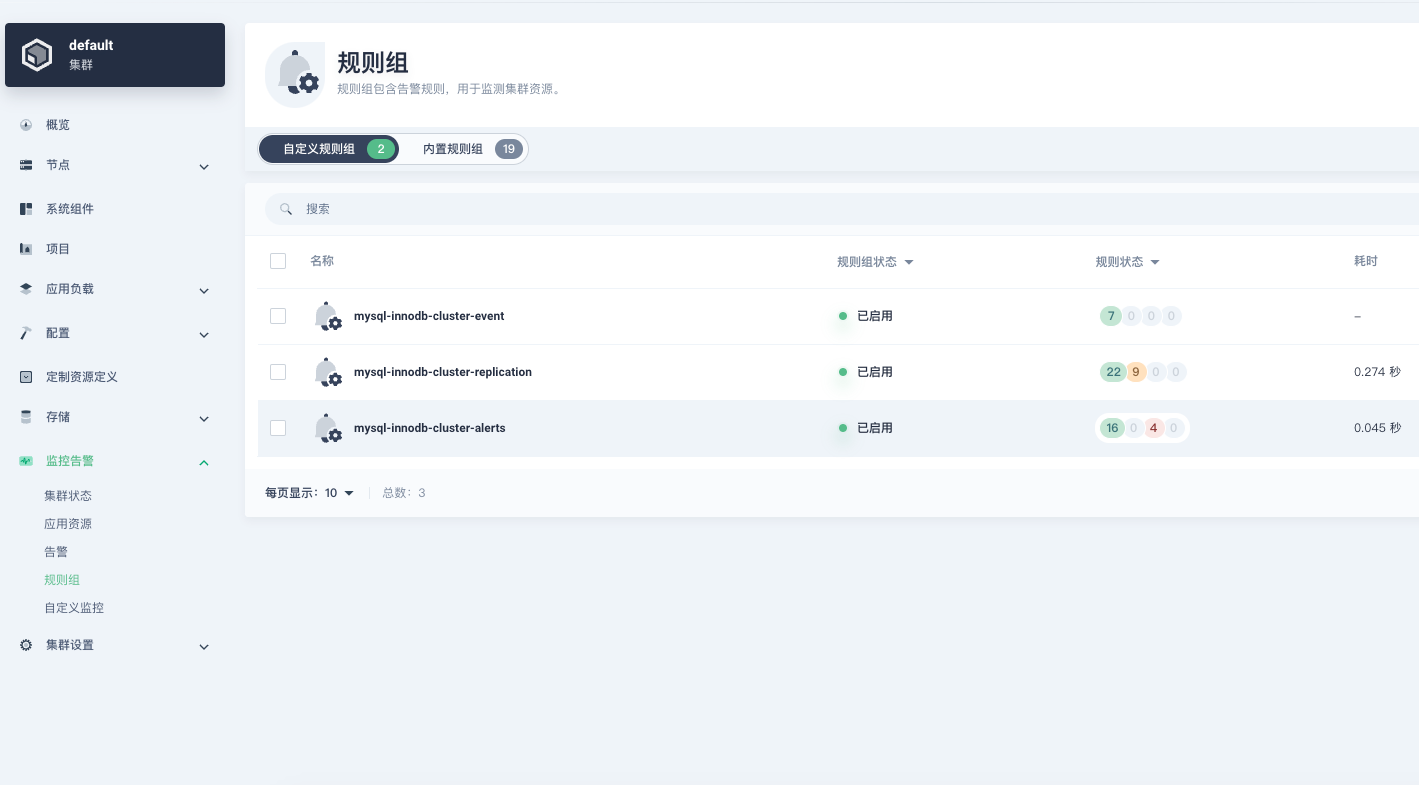
5. 提交相关配置
[root@k8s-master1 exporter]# ls -lah
total 56K
drwxr-xr-x 2 root root  183 May 25 17:24 .
drwxr-xr-x 4 root root   35 May 25 17:09 ..
-rw-r--r-- 1 root root  12K May 25 17:19 deployment.yaml
-rw-r--r-- 1 root root 4.3K May 25 17:24 mysql-innodb-cluster-event.yaml
-rw-r--r-- 1 root root  18K May 25 17:23 mysql-innodb-cluster-replication.yaml
-rw-r--r-- 1 root root 9.5K May 25 17:22 mysql-innodb-cluster-status.yaml
-rw-r--r-- 1 root root  787 May 25 17:20 servicemonitoring.yaml
[root@k8s-master1 exporter]# kubectl apply -f .
deployment.apps/mysql-innodb-cluster-exporter unchanged
service/mysql-innodb-cluster-exporter unchanged
configmap/mysql-innodb-cluster-0 unchanged
configmap/mysql-innodb-cluster-1 unchanged
configmap/mysql-innodb-cluster-2 unchanged
prometheusrule.monitoring.coreos.com/mysql-innodb-cluster-event created
prometheusrule.monitoring.coreos.com/mysql-innodb-cluster-replication created
prometheusrule.monitoring.coreos.com/mysql-innodb-cluster-status created
servicemonitor.monitoring.coreos.com/mysql-innodb-cluster-exporter unchanged

# 查看规则
[root@k8s-master1 exporter]# kubectl get prometheusrules -n mysql-cluster
NAME                               AGE
mysql-innodb-cluster-event         65s
mysql-innodb-cluster-replication   65s
mysql-innodb-cluster-status        65s

# 查看服务发现
[root@k8s-master1 exporter]# kubectl get servicemonitors -n kubesphere-monitoring-system
NAME                            AGE
alertmanager-main               63d
coredns                         63d
etcd                            63d
ks-apiserver                    63d
ks-controller-manager           63d
kube-apiserver                  63d
kube-controller-manager         63d
kube-scheduler                  63d
kube-state-metrics              63d
kubelet                         63d
mysql-innodb-cluster-exporter   5m55s
mysql-mgr-cluster-exporter      57d
node-exporter                   63d
prometheus-k8s                  63d
prometheus-operator             63d
thanos-ruler-kubesphere         63d
6. 告警模版
注意:该告警模版是配合 prometheus + alertmanger + prometheusAlert 使用的,并没有使用 kubesphere 进行通知
{{ $alertmanagerURL := "http://192.168.233.32:32093" -}}
{{ $alerts := .alerts -}}

{{ range $alert := $alerts -}}
  {{ $urimsg := "" -}}
  {{ range $key,$value := $alert.labels -}}
    {{ $urimsg = print $urimsg $key "%3D%22" $value "%22%2C" -}}
  {{ end -}}

  {{/* 告警标题 */}}
  {{ if eq $alert.status "resolved" -}}
🟢 MySQL恢复通知 🟢
  {{ else if eq $alert.labels.severity "critical" -}}
🚨 [全员注意] MySQL严重告警 🚨
<at id=all></at>  {{/* 严重告警时@全员 */}}
  {{ else -}}
🚨 MySQL告警通知 🚨
  {{ end -}}

---

🔧 **数据库监控详情** {{ if eq $alert.status "resolved" }}✅{{ else }}❗{{ end }}
🖥️ **实例地址**: {{ $alert.labels.instance }}
📦 **Pod名称**: {{ $alert.labels.pod }}
⚠️ **告警级别**: {{ $alert.labels.severity }} {{ if eq $alert.labels.severity "critical" }}🔥{{ else if eq $alert.labels.severity "warning" }}⚠️{{ end }}
🕒 **开始时间**: {{ GetCSTtime $alert.startsAt }}
{{ if eq $alert.status "resolved" }}🕒 **结束时间**: {{ GetCSTtime $alert.endsAt }}{{ end }}
{{ if $alert.labels.database }}🗃️ **数据库名称**: {{ $alert.labels.database }}{{ end }}
{{ if $alert.labels.alertname }}🔔 **告警类型**: {{ $alert.labels.alertname }}{{ end }}

---

📝 **告警描述**
{{ $alert.annotations.description }}

🚀 **快速操作**
- [🔇 屏蔽该告警]({{ $alertmanagerURL }}/#/silences/new?filter=%7B{{ SplitString $urimsg 0 -3 }}%7D)
- [🔍 查看监控详情]({{ $alert.generatorURL }})

---

🛠️ **处理建议**
{{ if or (eq $alert.labels.alertname "MySQL连接数过高") (eq $alert.labels.alertname "MySQL活跃连接数过高") }}
1. 连接数分析:
   - 当前连接数: `SHOW STATUS LIKE 'Threads_connected'`
   - 最大连接数: `SHOW VARIABLES LIKE 'max_connections'`
   - 连接来源: `SELECT * FROM information_schema.processlist`

{{ else if eq $alert.labels.alertname "MySQL查询响应慢" }}
1. 慢查询分析:
   - 查看慢查询: `SELECT * FROM mysql.slow_log ORDER BY start_time DESC LIMIT 10`
   - 当前长事务: `SELECT * FROM information_schema.innodb_trx`

{{ else if eq $alert.labels.alertname "MySQL复制延迟" }}
1. 复制状态检查:
   - 主从状态: `SHOW SLAVE STATUS\G`
   - 延迟分析: 查看Seconds_Behind_Master值

{{ else }}
1. 通用诊断:
   - 数据库状态: `SHOW ENGINE INNODB STATUS`
   - 性能指标: `SHOW GLOBAL STATUS LIKE 'Innodb%'`
   - 错误日志: `SHOW VARIABLES LIKE 'log_error'`
{{ end }}

{{ if and (ne $alert.status "resolved") ($alert.labels.owner) }}
📌 **责任人**: 暂无
{{ end }}
{{ end }}
7. alertmanager 配置
注意:该配置是 helm 的 prometheus values 文件,可参考:Helm 部署 kube-prometheus-stack
并且 promerules 使用是 prometheus 的部署的,并不是 kubesphere 内置的,注意自己修改
并且告警规则中我定义了两个标签,所以下面的配置中也是匹配的两个标签 app: critical severity: critical
    route:
      group_by: ['alertname', 'namespace', 'owner_kind', 'owner_name', 'instance', 'pod']  # 根据告警名称、命名空间、实例和 pod 进行分组,防止分散过多的重复告警
      group_wait: 30s  # 等待 30 秒以便可能会有更多的告警合并
      group_interval: 5m  # 告警组发送间隔为 5 分钟
      repeat_interval: 1h # 告警每 1 小时重复一次
      receiver: critical-alerts  # 默认告警接收器为 critical-alerts,处理严重告警
      routes:
      ############################### Custom rules 自定义告警推送##################################
      #### Mysql 严重告警推送 ####
      - match:
          app: critical
          severity: critical # 匹配级别
        receiver: mysql-rules  # 严重告警发送到 mysql-rules 接收器
        group_interval: 5m  # 严重告警每 5 分钟可以发送一组
        repeat_interval: 1h  # 严重告警每 1 小时重复提醒一次
        continue: false
      #### Mysql 警告告警推送 ####
      - match:
          app: warning
          severity: warning
        receiver: mysql-rules  # 警告告警发送到 mysql-rules 接收器
        repeat_interval: 4h  # 警告告警每 4 小时重复提醒一次
        continue: false

      - match_re:  # 正则匹配 job 标签
          job: ".*mysql-innodb-cluster.*"
        match:     # 精确匹配其他标签
          app: "warning"
          severity: "critical"
        receiver: mysql-rules
        group_interval: 5m
        repeat_interval: 1h
        continue: false

    receivers:
      - name: mysql-rules
        webhook_configs:
          - url: http://webhook-service:8080/prometheusalert?type=fs&tpl=feishu_mysql_alert&fsurl=https://open.feishu.cn/open-apis/bot/v2/hook/xxxxxxxx-xxxx-xxxxx-xxxxx-xxxxxxxx
告警展示
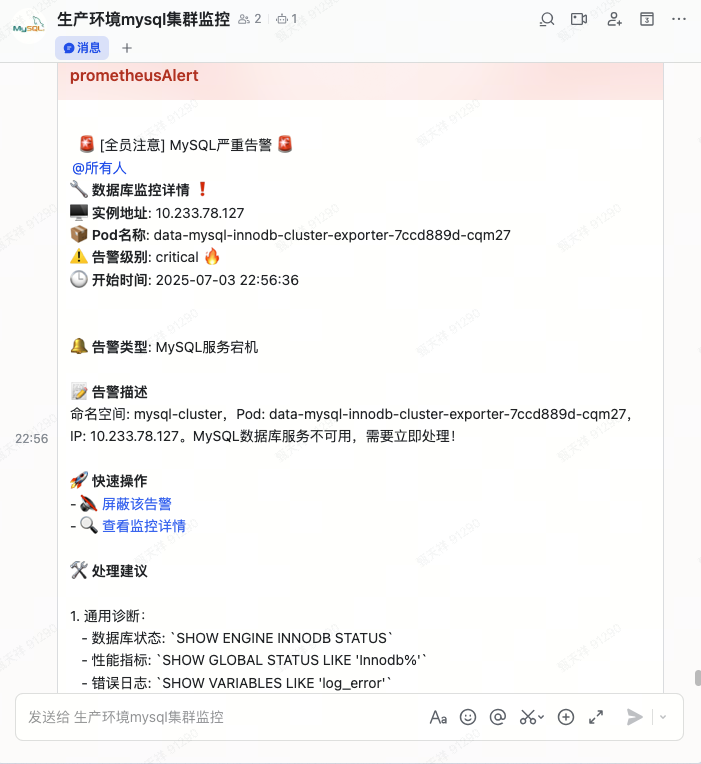
五、集群故障处理
1. 三个节点均 OFFLINE
如果三个pod,依次逐个重启,有很小的概率会发生集群故障,如(OFFLINE)状态,如有批量重启,百分百会导致集群故障
# 这里我只演示查看 pod-0 了,其余两个不看了
[root@k8s-app-1 helm-package]# kubectl -n mysql-cluster exec -it data-mysql-innodb-cluster-0 -c set-cluster -- mysqlsh --uri adminuser:123456@localhost:3306
 MySQL  localhost:3306 ssl  JS> \sql
 MySQL  localhost:3306 ssl  SQL > SELECT * FROM performance_schema.replication_group_members;
+---------------------------+--------------------------------------+---------------------------------------------------------------------------------------+-------------+--------------+-------------+----------------+----------------------------+
| CHANNEL_NAME              | MEMBER_ID                            | MEMBER_HOST                                                                           | MEMBER_PORT | MEMBER_STATE | MEMBER_ROLE | MEMBER_VERSION | MEMBER_COMMUNICATION_STACK |
+---------------------------+--------------------------------------+---------------------------------------------------------------------------------------+-------------+--------------+-------------+----------------+----------------------------+
| group_replication_applier | e78e4c6f-589a-11f0-9df5-1ac466325c44 | data-mysql-innodb-cluster-0.data-mysql-innodb-cluster.mysql-cluster.svc.cluster.local |        3306 | OFFLINE      |             |                | MySQL                      |
+---------------------------+--------------------------------------+---------------------------------------------------------------------------------------+-------------+--------------+-------------+----------------+----------------------------+
1 row in set (0.0008 sec)
# 执行从集群完全中断的状态中恢复
MySQL localhost:3306 ssl JS > dba.rebootClusterFromCompleteOutage();
Restoring the Cluster 'InnoDB_Cluster8' from complete outage...
Cluster instances: 'data-mysql-innodb-cluster-0.data-mysql-innodb-cluster.mysql-cluster.svc.cluster.local:3306' (OFFLINE), 'data-mysql-innodb-cluster-1.data-mysql-innodb-cluster.mysql-cluster.svc.cluster.local:3306' (OFFLINE), 'data-mysql-innodb-cluster-2.data-mysql-innodb-cluster.mysql-cluster.svc.cluster.local:3306' (OFFLINE)
Waiting for instances to apply pending received transactions...
Validating instance configuration at localhost:3306...
This instance reports its own address as data-mysql-innodb-cluster-0.data-mysql-innodb-cluster.mysql-cluster.svc.cluster.local:3306
Instance configuration is suitable.
* Waiting for seed instance to become ONLINE...
data-mysql-innodb-cluster-0.data-mysql-innodb-cluster.mysql-cluster.svc.cluster.local:3306 was restored.
Validating instance configuration at data-mysql-innodb-cluster-1.data-mysql-innodb-cluster.mysql-cluster.svc.cluster.local:3306...
This instance reports its own address as data-mysql-innodb-cluster-1.data-mysql-innodb-cluster.mysql-cluster.svc.cluster.local:3306
Instance configuration is suitable.
Rejoining instance 'data-mysql-innodb-cluster-1.data-mysql-innodb-cluster.mysql-cluster.svc.cluster.local:3306' to cluster 'InnoDB_Cluster8'...
Re-creating recovery account...
* Waiting for the Cluster to synchronize with the PRIMARY Cluster...
** Transactions replicated ############################################################ 100%
The instance 'data-mysql-innodb-cluster-1.data-mysql-innodb-cluster.mysql-cluster.svc.cluster.local:3306' was successfully rejoined to the cluster.
Validating instance configuration at data-mysql-innodb-cluster-2.data-mysql-innodb-cluster.mysql-cluster.svc.cluster.local:3306...
This instance reports its own address as data-mysql-innodb-cluster-2.data-mysql-innodb-cluster.mysql-cluster.svc.cluster.local:3306
Instance configuration is suitable.
Rejoining instance 'data-mysql-innodb-cluster-2.data-mysql-innodb-cluster.mysql-cluster.svc.cluster.local:3306' to cluster 'InnoDB_Cluster8'...
Re-creating recovery account...
NOTE: User 'mysql_innodb_cluster_102'@'%' already existed at instance 'data-mysql-innodb-cluster-0.data-mysql-innodb-cluster.mysql-cluster.svc.cluster.local:3306'. It will be deleted and created again with a new password.
* Waiting for the Cluster to synchronize with the PRIMARY Cluster...
** Transactions replicated ############################################################ 100%
The instance 'data-mysql-innodb-cluster-2.data-mysql-innodb-cluster.mysql-cluster.svc.cluster.local:3306' was successfully rejoined to the cluster.
The Cluster was successfully rebooted.# 再次查看集群状态
<Cluster:InnoDB_Cluster8>
MySQL localhost:3306 ssl JS > var cluster = dba.getCluster()
MySQL localhost:3306 ssl JS > print(cluster.status())
{
"clusterName": "InnoDB_Cluster8",
"defaultReplicaSet": {
"name": "default",
"primary": "data-mysql-innodb-cluster-0.data-mysql-innodb-cluster.mysql-cluster.svc.cluster.local:3306",
"ssl": "REQUIRED",
"status": "OK",
"statusText": "Cluster is ONLINE and can tolerate up to ONE failure.",
"topology": {
"data-mysql-innodb-cluster-0.data-mysql-innodb-cluster.mysql-cluster.svc.cluster.local:3306": {
"address": "data-mysql-innodb-cluster-0.data-mysql-innodb-cluster.mysql-cluster.svc.cluster.local:3306",
"memberRole": "PRIMARY",
"mode": "R/W",
"readReplicas": {},
"replicationLag": "applier_queue_applied",
"role": "HA",
"status": "ONLINE",
"version": "8.0.32"
},
"data-mysql-innodb-cluster-1.data-mysql-innodb-cluster.mysql-cluster.svc.cluster.local:3306": {
"address": "data-mysql-innodb-cluster-1.data-mysql-innodb-cluster.mysql-cluster.svc.cluster.local:3306",
"memberRole": "SECONDARY",
"mode": "R/O",
"readReplicas": {},
"replicationLag": "applier_queue_applied",
"role": "HA",
"status": "ONLINE",
"version": "8.0.32"
},
"data-mysql-innodb-cluster-2.data-mysql-innodb-cluster.mysql-cluster.svc.cluster.local:3306": {
"address": "data-mysql-innodb-cluster-2.data-mysql-innodb-cluster.mysql-cluster.svc.cluster.local:3306",
"memberRole": "SECONDARY",
"mode": "R/O",
"readReplicas": {},
"replicationLag": "applier_queue_applied",
"role": "HA",
"status": "ONLINE",
"version": "8.0.32"
}
},
"topologyMode": "Single-Primary"
},
"groupInformationSourceMember": "data-mysql-innodb-cluster-0.data-mysql-innodb-cluster.mysql-cluster.svc.cluster.local:3306"
}2. 从节点挂掉后重新加入 MGR 集群
一般 pod 重启会自愈,除非遇到特殊情况无法恢复才需要人工介入,比如三个 pod 批量同时重启了
场景说明
3节点InnoDB Cluster环境
mysql-innodb-cluster-2 节点脱离集群无法自动恢复
需要手动将其重新加入集群
集群服务DNS名称格式:
mysql-innodb-cluster-<N>.mysql-innodb-cluster.mysql-cluster.svc.cluster.local
1. 进入有问题的容器,一般 set-cluster 会一直运行
[root@k8s-master1 exporter]# kubectl -n mysql-cluster exec -it mysql-innodb-cluster-2 -c set-cluster -- bash2. 使用 TCP 本地连接(容器共享POD网络)
mysqlsh --uri adminuser:${ADMIN_PASSWORD}@127.0.0.1:33063. 检查集群状态
// 在MySQL Shell中执行
var cluster = dba.getCluster()
print(cluster.status())
4. 先尝试手动恢复
cluster.rejoinInstance('127.0.0.1:3306')如果失败,继续以下手动步骤
5. 手动重置复制组配置
-- 切换到SQL模式
\sql

-- 停止组复制
STOP GROUP_REPLICATION;

-- 重置复制配置
RESET REPLICA ALL;

-- 设置正确的group_seeds(使用K8s服务DNS名称)
SET GLOBAL group_replication_group_seeds = 'mysql-innodb-cluster-0.mysql-innodb-cluster.mysql-cluster.svc.cluster.local:33061,mysql-innodb-cluster-1.mysql-innodb-cluster.mysql-cluster.svc.cluster.local:33061';

-- 配置本地节点
SET GLOBAL group_replication_local_address = 'mysql-innodb-cluster-2.mysql-innodb-cluster.mysql-cluster.svc.cluster.local:33061';
6. 配置恢复凭据
-- 设置恢复用户凭据(根据您的实际配置调整)
SET GLOBAL group_replication_recovery_user = 'configuser';
SET GLOBAL group_replication_recovery_password = '123456';
7. 启动组复制
--- 这个用户是主节点新建集群使用的账户,所以一定要一致
START GROUP_REPLICATION USER='configuser', PASSWORD='123456';
8. 验证集群加入状态
// 切换回JS模式
\js

// 检查集群状态
var cluster = dba.getCluster()
print(cluster.status())

// 检查成员状态
cluster.describe()
9. 如果恢复完之后数据不一致
使用 clone 克隆的方法 clone 数据
// 先移除实例(在其他正常节点上执行)
// cluster.removeInstance('configuser@mysql-innodb-cluster-2:3306')

// 然后重新添加并使用克隆
cluster.addInstance('configuser@mysql-innodb-cluster-2:3306', {
  password: '123456',
  recoveryMethod: 'clone',
  label: 'mysql-innodb-cluster-2'
})
六、灾难级别集群故障
日志提示:
[ERROR] [MY-011526] [Repl] Plugin group_replication reported: 'This member has more executed transactions than those present in the group.'
[ERROR] [MY-011522] [Repl] Plugin group_replication reported: 'The member contains transactions not present in the group. The member will now exit the group.'
当整个 MGR 集群崩溃且节点间数据严重不一致时(出现事务差异错误),需要特殊处理。以下是详细恢复步骤:
情况分析
错误信息表明:
某个节点执行了其他节点没有的事务
通常发生在网络分区后出现脑裂,或节点异常写入
常规的
rejoinInstance无法解决
恢复方案选择
方案A:强制重置最完整的节点为新主(推荐)
适用场景:能确定哪个节点数据最完整/最新
方案B:从备份恢复整个集群
适用场景:无法确定哪个节点数据正确,但有可用备份
方案A:
1. 确定数据最完整的节点
# 在每个节点上检查GTID执行情况
mysql -e "SHOW GLOBAL VARIABLES LIKE 'gtid_executed';"
选择 gtid_executed 值最长的节点作为新主(通常是最高的数字)
2. 在选定的新主节点上操作(例如mysql-innodb-cluster-0)
-- 停止组复制
STOP GROUP_REPLICATION;

-- 重置集群元数据
SET GLOBAL group_replication_bootstrap_group=ON;
START GROUP_REPLICATION;
SET GLOBAL group_replication_bootstrap_group=OFF;

-- 验证单节点集群状态
SELECT * FROM performance_schema.replication_group_members;
3. 在其他节点上强制重置
可以通过 set-cluster 容器 mysql -h 127.0.0.1 登录到数据库中操作
-- 停止MySQL服务
STOP GROUP_REPLICATION;
RESET MASTER;
RESET REPLICA ALL;

-- 重要:清除可能导致冲突的数据
SET GLOBAL gtid_purged='<新主节点的gtid_executed值>';

-- 重新配置加入参数
CHANGE MASTER TO
  MASTER_USER='configuser',
  MASTER_PASSWORD='123456'
  FOR CHANNEL 'group_replication_recovery';

-- 启动组复制
START GROUP_REPLICATION;
4. 检查集群复制状态
MySQL localhost:3306 ssl SQL > SELECT * FROM performance_schema.replication_group_members;方案B:
从备份恢复整个集群
1. 完全清理所有节点
# 副本将为0
[root@k8s-master1 mysql-innodb-cluster]# kubectl scale -n mysql-cluster --replicas=0 statefulset mysql-innodb-cluster

# 删除 pvc 存储(切记一定要有 mysqldump 的备份)
[root@k8s-master1 mysql-innodb-cluster]# kubectl delete pvc -n mysql-cluster --all
2. 启动 pod 自动创建集群
[root@k8s-master1 mysql-innodb-cluster]# kubectl scale -n mysql-cluster --replicas=3 statefulset mysql-innodb-cluster七、MySQL Shell 常用命令
1. 删除节点
[root@k8s-master1 mysql-innodb-cluster]# kubectl exec -it -n mysql-cluster mysql-innodb-cluster-0 -c mysql -- \
mysqlsh --uri adminuser:123456@localhost:3306 --js -e \
"dba.getCluster().removeInstance('adminuser@mysql-innodb-cluster-2.mysql-innodb-cluster.mysql-cluster.svc.cluster.local:3306', {force: true})"
2. 加入集群
[root@k8s-master1 mysql-innodb-cluster]# kubectl exec -it -n mysql-cluster mysql-innodb-cluster-0 -c mysql -- \
mysqlsh --uri adminuser:123456@localhost:3306 --js -e \
"dba.getCluster().addInstance('adminuser@mysql-innodb-cluster-2.mysql-innodb-cluster.mysql-cluster.svc.cluster.local:3306', \
{recoveryMethod: 'clone', waitRecovery: true, interactive: false, ipAllowlist: '172.18.0.0/16'})"
3. 查看日志
[root@k8s-master1 mysql-innodb-cluster]# kubectl logs --tail=100 -f -n mysql-cluster mysql-innodb-cluster-0 set-cluster
[MySQL-Cluster] [2025-05-25 17:54:34] 执行命令(尝试 1/3): mysqlsh --uri adminuser:123456@mysql-innodb-cluster-0.mysql-innodb-cluster.mysql-cluster.svc.cluster.local:3306 -- cluster status
[MySQL-Cluster] [2025-05-25 17:54:34] 集群状态:
{
    "clusterName": "InnoDB_Cluster8",
    "defaultReplicaSet": {
        "name": "default",
        "primary": "mysql-innodb-cluster-0.mysql-innodb-cluster.mysql-cluster.svc.cluster.local:3306",
        "ssl": "REQUIRED",
        "status": "OK",
        "statusText": "Cluster is ONLINE and can tolerate up to ONE failure.",
        "topology": {
            "mysql-innodb-cluster-0.mysql-innodb-cluster.mysql-cluster.svc.cluster.local:3306": {
                "address": "mysql-innodb-cluster-0.mysql-innodb-cluster.mysql-cluster.svc.cluster.local:3306",
                "memberRole": "PRIMARY",
                "mode": "R/W",
                "readReplicas": {},
                "replicationLag": null,
                "role": "HA",
                "status": "ONLINE",
                "version": "8.0.32"
            },
            "mysql-innodb-cluster-1.mysql-innodb-cluster.mysql-cluster.svc.cluster.local:3306": {
                "address": "mysql-innodb-cluster-1.mysql-innodb-cluster.mysql-cluster.svc.cluster.local:3306",
                "memberRole": "SECONDARY",
                "mode": "R/O",
                "readReplicas": {},
                "replicationLag": null,
                "role": "HA",
                "status": "ONLINE",
                "version": "8.0.32"
            },
            "mysql-innodb-cluster-2.mysql-innodb-cluster.mysql-cluster.svc.cluster.local:3306": {
                "address": "mysql-innodb-cluster-2.mysql-innodb-cluster.mysql-cluster.svc.cluster.local:3306",
                "memberRole": "SECONDARY",
                "mode": "R/O",
                "readReplicas": {},
                "replicationLag": null,
                "role": "HA",
                "status": "ONLINE",
                "version": "8.0.32"
            }
        },
        "topologyMode": "Single-Primary"
    },
    "groupInformationSourceMember": "mysql-innodb-cluster-0.mysql-innodb-cluster.mysql-cluster.svc.cluster.local:3306"
}

+---------------------------+--------------------------------------+-----------------------------------------------------------------------------+-------------+--------------+-------------+----------------+----------------------------+
[root@k8s-master1 ~]# kubectl -n mysql-cluster exec -it mysql-innodb-cluster-1 -c mysql -- mysql -uroot -p123456 -e "SELECT * FROM performance_schema.replication_group_members;"
mysql: [Warning] Using a password on the command line interface can be insecure.
+---------------------------+--------------------------------------+-----------------------------------------------------------------------------+-------------+--------------+-------------+----------------+----------------------------+
| CHANNEL_NAME              | MEMBER_ID                            | MEMBER_HOST                                                                 | MEMBER_PORT | MEMBER_STATE | MEMBER_ROLE | MEMBER_VERSION | MEMBER_COMMUNICATION_STACK |
+---------------------------+--------------------------------------+-----------------------------------------------------------------------------+-------------+--------------+-------------+----------------+----------------------------+
| group_replication_applier | 1f5e429c-3917-11f0-ab8f-1aa3f9926048 | mysql-innodb-cluster-0.mysql-innodb-cluster.mysql-cluster.svc.cluster.local |        3306 | ONLINE       | PRIMARY   | 8.0.32         | XCom                       |
| group_replication_applier | 26882bb5-3917-11f0-ad48-0aed45a7cfd6 | mysql-innodb-cluster-1.mysql-innodb-cluster.mysql-cluster.svc.cluster.local |        3306 | ONLINE       | SECONDARY | 8.0.32         | XCom                       |
| group_replication_applier | 2cd2c062-3917-11f0-acbb-427d9504366f | mysql-innodb-cluster-2.mysql-innodb-cluster.mysql-cluster.svc.cluster.local |        3306 | ONLINE       | SECONDARY | 8.0.32         | XCom                       |
+---------------------------+--------------------------------------+-----------------------------------------------------------------------------+-------------+--------------+-------------+----------------+----------------------------+
4. 实验录屏
最终高可用演示结果
补充:使用 mysqlbinlog 导出 sql
./mysqlbinlog --no-defaults \
  --start-datetime="2025-06-30 11:00:00" \
  --stop-datetime="2025-07-01 1:00:00" \
  --base64-output=DECODE-ROWS \
  -v /var/lib/mysql/bin-log.000052 > ./binlog_2025-06-30_2025-07-01.sql